The Boss TAE Core Expander is a brilliant device that changes tube amps and volume forever... But does this Boss Reactive Load TAE Core change the tone?
Boss Tube Amp Expander Core Inside and Out Review 2026
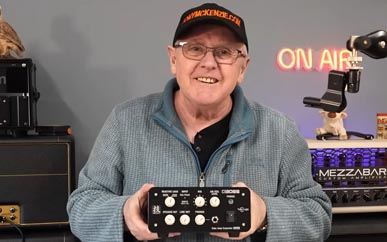
The little TAE Core Expander - small and beautiful!
Introduction and Preamble
Owning a tube amp used to be a dream for most guitarists, right? But over time in came the health and safety crew to stop you using those very loud amplifiers and those big 4x12 cabs that all of a sudden feel 'out of fashion'. Of course the H&S boys have a point (what was that you said) and a guitar amp with tubes or valves even with low wattage (20 watt) can seriously damage your hearing, so they are not entirely wrong. But it's like anything, use it right and you'll be fine. But then you have all those 'others' out there that might not want to hear it! You know, the 3 month old baby, the wife that has a headache, or someone else but whatever the case, it stops you dead from playing your beloved tube amp.
The simulator guys don't have this problem of course, but you might say well those are not 'men' are they? Now I wont get involved with any of that discussion but Boss have come to your rescue if you have a tube amp and want to crank it for those REAL and juicy tones. Yes they have made a device called the Boss tube amp expander core that can tame the amp even when its flat out and plugged in to a speaker cab - even a 4x12 cab :)
Musicians that like tube amps will tell you all day that 'there is nothing like a cranked amp for those incredible tones' - and anything that gets in the way will quickly be dismissed as rubbish. Take the 'resistor type of volume reducer' (I'll call it that, it's well known that those types of units change the tone of the tube amp quite dramatically often. Guitarists won't put up with that sort of tone displacement from something like those resistor based things that cannot really reproduce what the actual amp sounds like normally.
What they really need is a thing based on a reactive load design that won't most likely change the tone so in stepped Boss with the original TAE. I did review the original Boss TAE here and the great thing about that device is it can step up output as well as reduce it - and it added many things including handling high wattage amps.
But enough about the original Boss TAE - today I'm looking at the Boss TAE Core (it's a Waza Craft device too) - a device that is smaller, lower cost, and has a bunch of features that your amp might not have! It can reduce that volume dramatically so let's check it out.
Inside the TAE Core
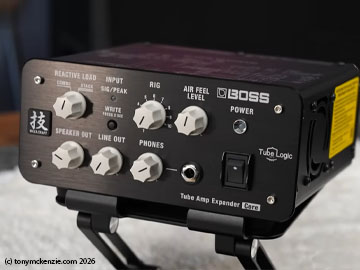
It's a pretty cool looking unit for sure, but it does lack some of the features of the full sized TAE device. Not to worry, we'll look closer later about all of that. Right now I'm going to open up the TAE core to see exactly what I have bought - sometimes there are problems, but I have to say on Roland and Boss equipment its usually pretty well made. This unit by the way is about 8" wide, 3.5" height and around 7" deep.
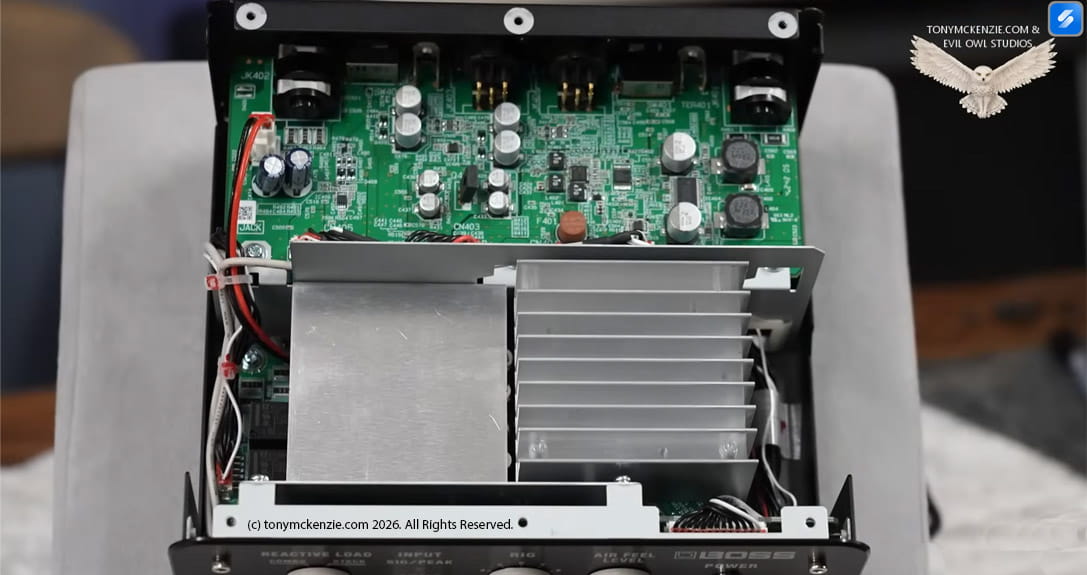
Taking the first look inside right off its easy to see that this is a Boss device, and look at that huge heat sink! The rest of the board further back is really well made on a machine as Boss equipment usually is. Connected to the board you see is the I/O from the inside of the unit. And while that's all good quality do remember that those connectors may flex the board if given rough use - something you don't want. But the overall quality of that board from what I see is that the build really is exceptional.
There are two other boards inside the TAE core, one below the one you see, and another board below that heat sink, but I'm going to show you both of them if that's possible so you get a really good idea about the quality overall and what's on those boards.
Components Under The Heat Sink
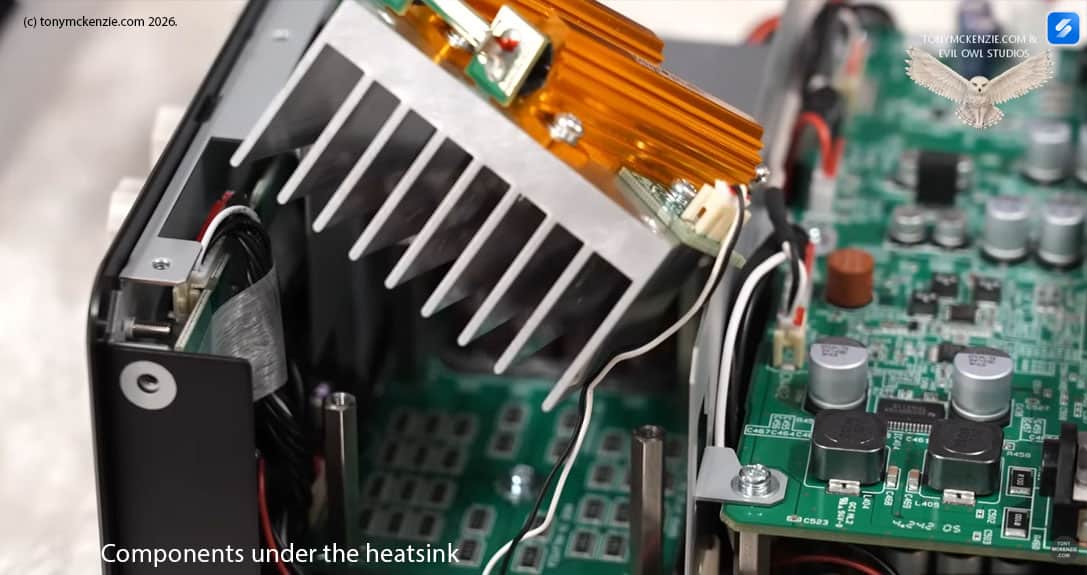
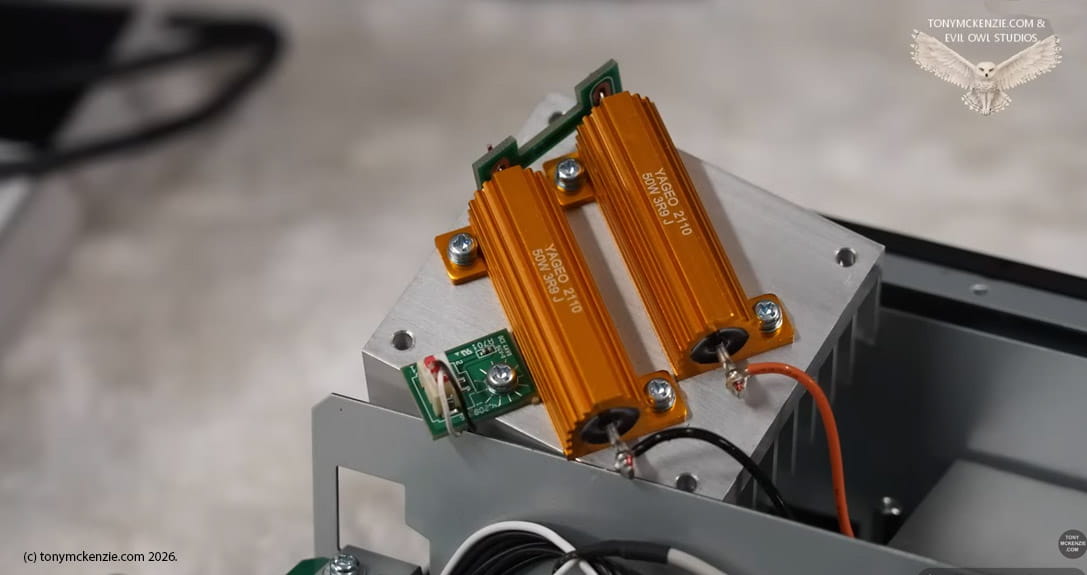
Well here's the heat sink itself turned over and attached are two 50 watt resistors and those will generate lots of heat, so that's why the heat sink is there. You might notice also the sensors that will shut down the unit if its overheating - a good thing to have in there for sure. And that board below this is really intriguing for sure, lets take a look.
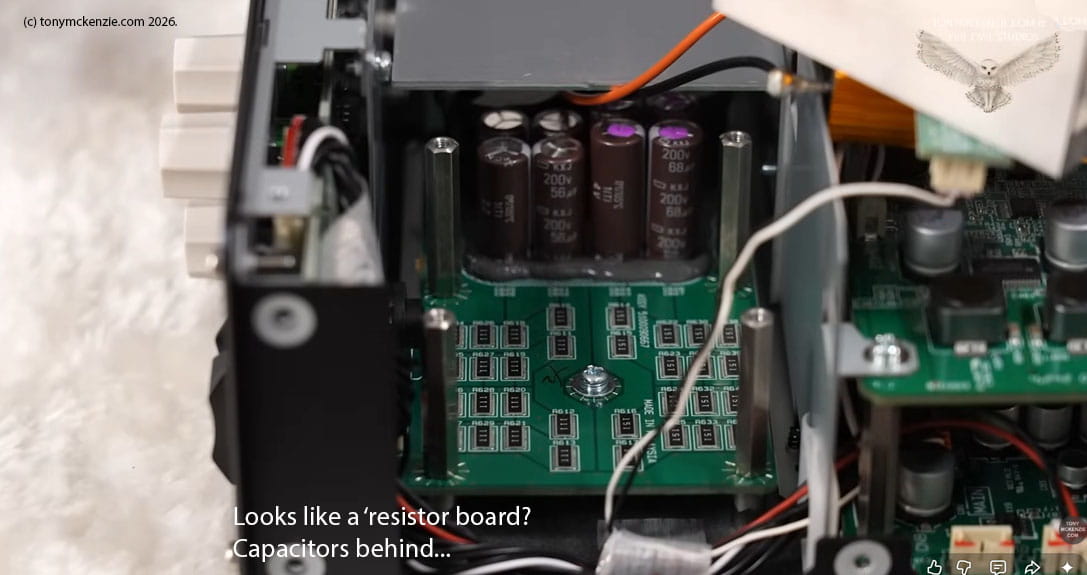
My guess is it looks like some sort of resistor array... maybe some weird resistor board or something like that with those electrolytic capacitors behind them. Honestly, I can't be sure what that board does, but if you know PLEASE come and tell me so I can educate other guys too. In any event the quality remains spectacular throughout.
The Main Board
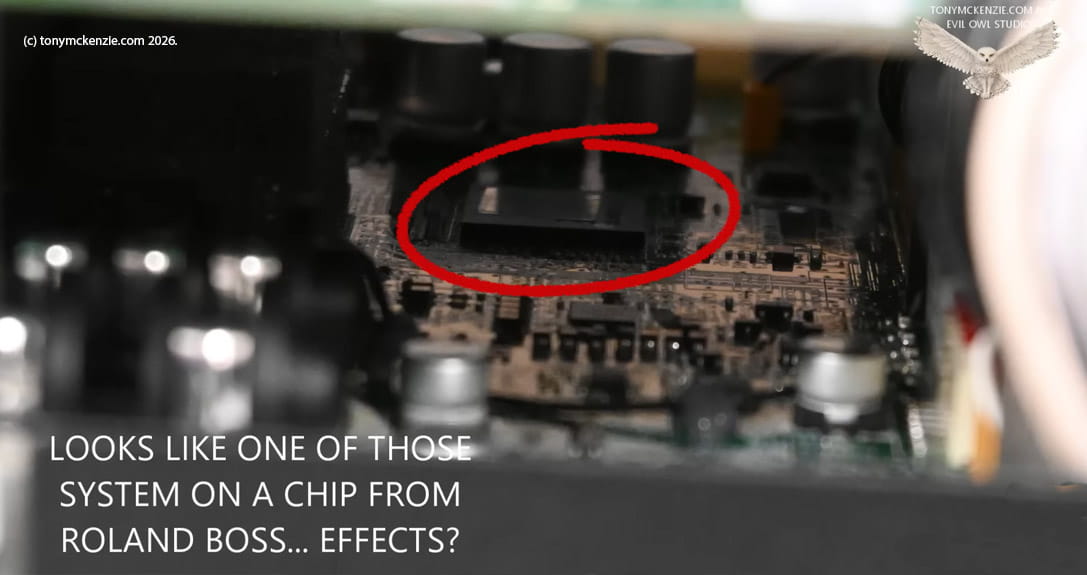
Ah this is a SOC chip (system on a chip) I think - a proprietary Roland/Boss device that they seem to fit in lots of musical equipment. It's likely handling the stuff like that 'AIR FEEL' level and more about that later. Again, it shows that Boss have a good level of technology in this unit as opposed to just some resistors! Quality is excellent again. More about the System on a Chip later in the review.
Honestly, I can't get to see much else inside this TAE but I did see a few components that looked surprisingly similar to what was in the original full sized Boss tube amp expander. Some of the chips from that unit really do look the same from the acute angles I managed to see in to.
Lastly I want to point out that there is an internal brushless fan that blows cold air over the insides to keep it cool when things might start to warm up.
Internal Build Conclusion
It's a fact that when I look inside Roland or Boss equipment to date
I have never found a single botch or something that was somehow poor
quality - and in this unit it is as good as it is in all the other
gear - you have to give credit where its due and Boss have created a
very high quality device in this TAE core. From this side of things
I can only recommend the unit as its basically perfect build
quality. No silicone sealer in here!Front Controls on the Tube Amp Expander
Below I show you the front panel of the Roland Boss TAE Core -
it's a Wazacraft unit and
describe what everything is used for.
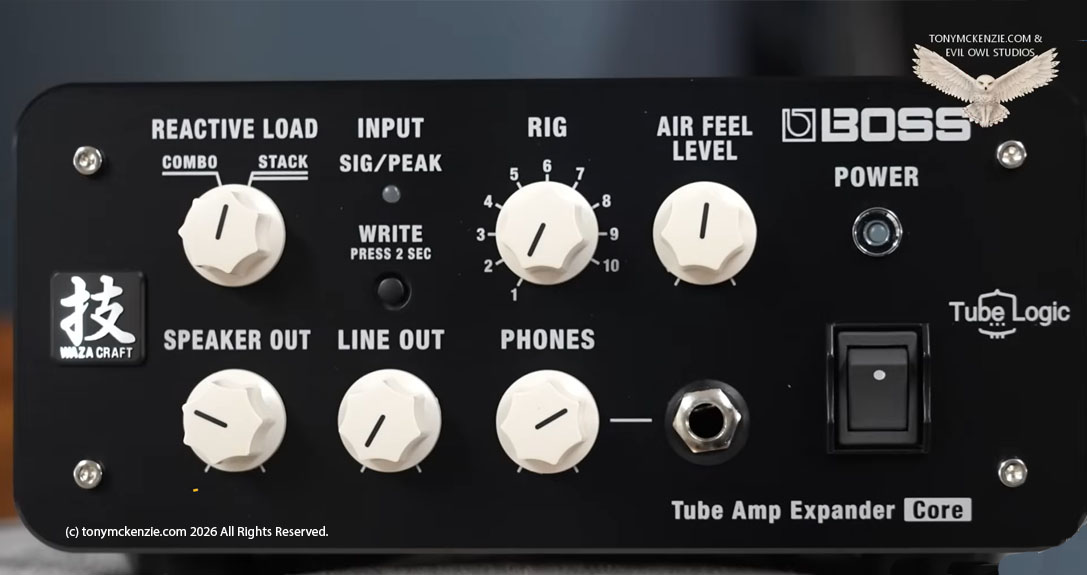
It's a nice looking device and the black and white finish sort of sets it off for most environments of use really. But lets take a look at the controls closer:
Reactive Load
It all sounds weird right? What the hell is a reactive load? If you're unfamiliar with the term it might sound like magic or something. Sadly its not magic at all :) but there are two settings - one for a 'combo' and one for a 'stack' you can see them in the images and you can choose either or... But what is it Tony? Well it creates a load on the guitar amp that (as far as the amp is concerned) appears to be a real speaker. The amp won't know any difference. Now then, there are TWO reactive circuits inside the TAE core and each is designed to provide the optimal sound for each type of amp - combo or stack accordingly.
- The COMBO is like using a 1x12 or even a 2x12 speaker setup in its cab
- The STACK is more like using a closed back cab in a 4x12 configuration
In any case, you can really tell the difference in sound depending on which choice you make here. I'll mention that speakers can be chosen from a comprehensive choice of 4x12s, 4x10s, 2x12s, 1x12s, 1x10s and even three 1x8s within the software. There is really much more to the aspects of speakers, IR's etc. and I might cover that later in the software.
Input
There's a little led under the signal/peak text on the front of the TAE, This monitors the input to the TAE from the tube amp jack. This should be green, but if it shows a red color then you need to adjust the amp feed accordingly to get the signal green.
Rig
Next across the front is the Rig control. This is a switch with 10 positions. You are able to store up to 10 different 'setups' one in each position of the knob. There's an 'application' available to do that, but more about that later.
Write Button
This simply writes out the settings to the selected Rig number on the Rig knob.
Air Feel
I came across this air feel control some while back. I was the 'one' who bought the Wazacraft amp? The big black behemoth amp they made that was without tubes, and it was (apparently) all emulated - even the circuit was emulated inside the amp. The Wazacraft amp was hugely expensive (I think around £2500 originally) but I bought one of the last ones I think for about £400 (or something like that) at 'end of line' clearance. It was and is incredibly made with amazing technology inside - I did review the Wazacraft amp and that amp I still own, but it does not get used much I admit. It never caught on really.
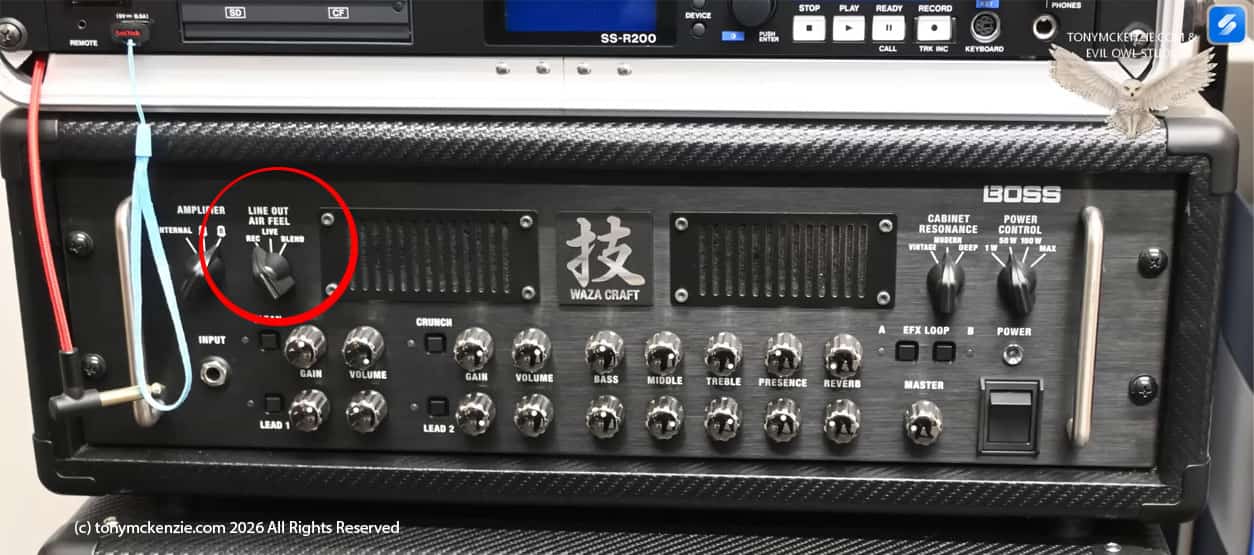
But among the controls on that amp was a similar control to the air feel on this TAE core. So my guess is that they took the technology from the Wazacraft amp and used the different things in other gear, just as you see right now.
In any case the Air Feel control apparently can change the feel and ambience from the line out connector, the phones and the USB port. I can't tell you that I'm personally convinced about the Air Feel control, but it is subjective - anyone that says it does what it says why not tell me your opinion - I would love to hear it.
Speaker Out
Yes on the TAE core there is a knob labeled speaker out. It actually does send the output of the TAE to the speaker cab! Simples.
Line Out Control
Similarly the line out control increases or decreases the line out signal from the TAE core. It adjusts the L & R connectors output on the back of the unit.
Phones
There is a phones connector for those, and you simply adjust the level to the headphones with the phones knob. Bear in mind that if you plug in the headphones to this socket that it will disconnect the speaker. Well you asked for silent playing right? Now you have it.
Lastly there's a power light and an on and off switch - and I can assume any reader will be familiar with that sort of thing. But there is one thing you won't know. The power LED can be normally a blue color, but if its a blinking yellow or a red then the TAE is overheating and may shut down.
I/O on the Tube Amp Expander
After the front of the TAE, its time to checkout the I/O around the back so here we examine all the connectors etc. and describe what they do exactly.
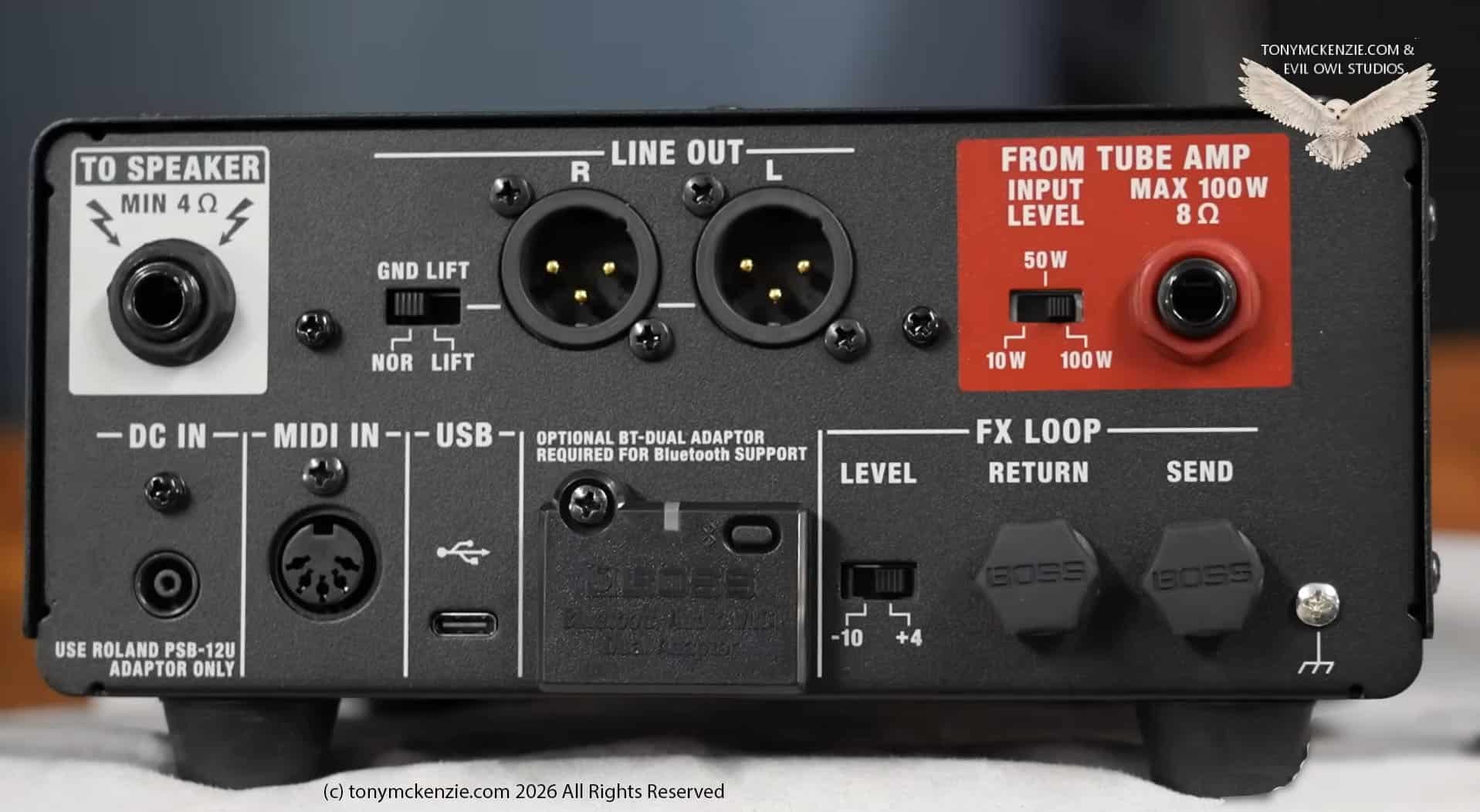
OK I think we'll go from this top corner IO called 'To Speaker' first and work our way around... its not that hard but worth understanding how it all works.
To Speaker
Here is the output of the TAE core that connects directly to the speaker cab. Importantly it has to have at least 4 Ohms loading or there will be trouble. However, it's not obvious, but you don't have to have a speaker connected to the TAE core! There are other outputs you can use for different things and I'll cover them in this section. Bear in mind the cable should be a SPEAKER CABLE and not anything else.
Line Out
Next along the top are the two line out connectors - Left and Right. Push this to the recording desk if you want. And there's a ground lift switch in case you get hum problems.
From Tube Amp
Connect the tube amp to this RED input. The MAXIMUM input for the TAE core is 100 watts at 8 ohms and do not exceed it. Use a proper speaker cable for the connection from the amp to this connector. There's also a switch for 10 watts, 50 watts or 100 watts operation to this input.
Here's an example. if you're using a 10 watt amp, set the switch to 10 watts or 50 watts. If the front LED goes from green to flashing amber or red then set this switch to 50 watts although its a 10 watt amp. That way you won't overload the TAE.
Power In
The power in uses a special Roland power supply and please ensure you only use the PSB-12U adaptor for the TAE and nothing else.
MIDI In
Yes the unit has a 5 pin DIN connector socket and you can control this with MIDI if you need to. Personally I have NOT tried it!
USB C connector
There is one, it can be connected to a PC etc. and more on this later in the review.
BT Interface
Note that as standard the interface DOES NOT come with the TAE and they charge you around £40.00 in the UK to buy one. I have one fitted and then you can connect Bluetooth devices accordingly. I recommend you buy one! More maybe on this later when we cover software app because your phone won't connect without this interface. The unit is called a BT Dual unit.
FX Loop
Very useful if your amp does not have a loop - as many classic amps don't, but with this now they do! Its a useful addition and can be set with the switch at the side to -10 or +4dB (standard or professional levels.
Grounding
There is also a grounding point if you get any grounding issues going on in the form of hums etc.
Lastly around the side of the device is that fan I showed you when we were inside the unit and it just keeps things cool! Heed the warnings that Boss have put on the side to protect your tube amp.
This concludes the I/O section of the review.
The Power Supply
I think we need to discuss the power supply as supplied with the TAE core unit so let's take a look.
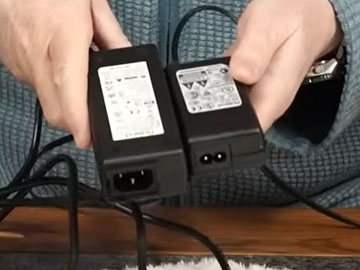
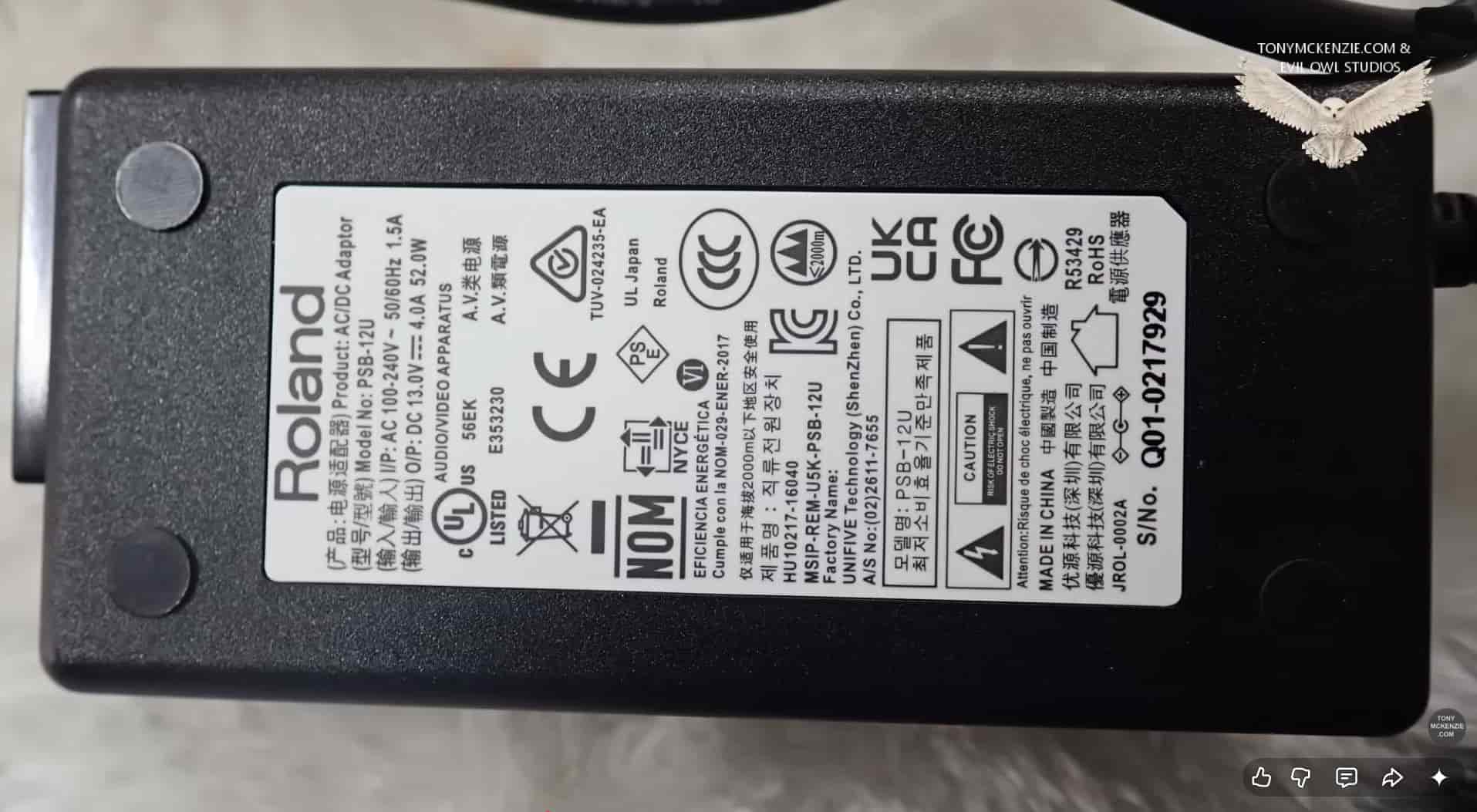
So take a look at the above picture and on the left is the power supply for the TAE core and on the right is the standard Roland Boss power supply (a PSA-1U and that's just 2A out.). There is a massive difference and the unit really does need that extra large power supply to operate properly. The actual power supply is a PSB-12U and is 13 Volts @ 4 Amps. And also it has a positive center. Clearly mixing up power supplies and arriving at a gig will stop you using the core device for that gig. Trying to get a replacement 'on the night' is a definite no. I just wanted to highlight this as this sort of thing can happen.
Speaker Cable
While I have mentioned the speaker cable a couple of times already, I cannot emphasize how important it is to use correct speaker cables where they should be used. You are dealing with high power on the input side most likely and high power on the output side too again most likely... Me? I use Ernie Ball speaker cables and those are exactly the right cable, two cores at specific sizes etc. and the connectors are so good that they really are hard to remove. With a speaker cable or cables like the Ernie Ball ones you will be fine. But whatever you do, DO NOT USE GUITAR CABLES. Note that I have NOT been sponsored to recommend the Ernie Ball speaker cables by anyone and I actually bought mine just like you do.
The Manual
Whatever your opinion about printed manuals, make no mistake they are important. And in this case Roland Boss supplied one!
Yes the operation reference manual is supplied in the box for the TAE core and to be honest its great to see a printed manual. Just imagine some of the other stuff I see - its so common place its crazy. Here you are, no manual supplied and its online. So you get to the gig, have some weird problem and pull up the online manual! You can neither find what you want or can't read it as its so small. There is another alternative of course, you get to the gig, have the problem, try to get online and there's no service!
In either of those cases you're stewed, you either fix it yourself or you don't use the gear. Over and over I have seen companies that are basically saving money by not including a proper printed manual for the user, and for equipment like this where you might have situations like I just described it becomes unworkable. So three cheers to Roland Boss for printing a manual.
The actual manual is only 12 pages thick so its no bother to find what you want - and remember with equipment like this you CAN damage your amp if you get things wrong. Take note. Other things covered include the Bluetooth connectivity etc. so it is a useful manual.
MIDI Pedal
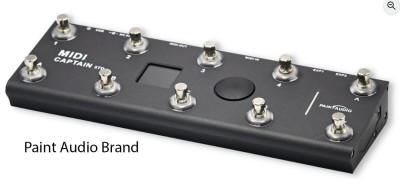
I did say earlier that you can use a MIDI pedal to control this core unit and really you might well get away with near enough any on the market. While Roland Boss point you to their website but don't offer a specific pedal (absolutely true) they leave it up to you to find one on their website, personally I would be looking on Amazon! Yes I recently bought a MIDI controller pedal from a company called Paint Audio a MIDI Captain Foot Controller that costs about £100 in the UK but that pedal is really cool check it out. They make many MIDI controllers and they all seem to be OK to me. I bought this too - no sponsor! Hopefully this info will help someone.
Boss TAE Core Specifications
While we buy this gear and just use it, the specifications can give away a cheap device compared to a quality one...
- Specifications
- Maximum Input Power FROM TUBE AMP: 100 W
- Safety Load (power off) FROM TUBE AMP: 330 ohms
- Rated Power Output TO SPEAKER: 30 W (8 ohms) - This can boost a 5 watt amp up to 30 watts!
- Load Impedance TO SPEAKER: 4-16 ohms
- Input Impedance FROM TUBE AMP: 8 ohms
- FX LOOP RETURN: 1 M ohm
- Output Impedance LINE OUT L/R: 600 ohms
- FX LOOP SEND: 1 k ohm
- Nominal Output Level LINE OUT L/R: +4 dBu
- FX LOOP Nominal Input/output Level-10/+4 dBu (selectable)
- Maximum Output Level LINE OUT L/R: +13 dBu
- FX LOOP SEND: +6 dBu (-10) /+20 dBu (+4)
- Controls
- POWER switch
- SPEAKER OUT knob
- LINE OUT knob
- PHONES knob
- REACTIVE LOAD knob
- RIG knob
- AIR FEEL LEVEL knob
- WRITE button
- INPUT LEVEL switch
- FX LOOP LEVEL switch
- GND LIFT switch
- Indicators
- POWER
- WRITE
- INPUT SIG/PEAK
- Connectors
- FROM TUBE AMP jack: 1/4-inch phone type
- TO SPEAKER jack: 1/4-inch phone type
- LINE OUT L/R connectors: XLR type
- PHONES jack: Stereo 1/4-inch phone type
- FX LOOP SEND jack: 1/4-inch phone type
- FX LOOP RETURN jack: 1/4-inch phone type
- USB port: USB Type-C®
- MIDI IN connector
- Bluetooth® adaptor connector: Dedicated connector
- DC IN jack
- Power Supply
- AC adaptor
- Current Draw 470 mA
- Accessories
- Owner's manual
- AC adaptor
- Power cord
For a different look at the TAE Core specs click here
Software Available
So, on to the software available and my experience of using it with the TAE Core.
A quick overview of the software here as this review is growing and growing! But the software and my experience of it might prove useful to others. The editor can be used on an iPhone - I used it on a PC if I remember and it worked fine, but ensure you have good eyesight if using an iPhone.
Cab - Mic
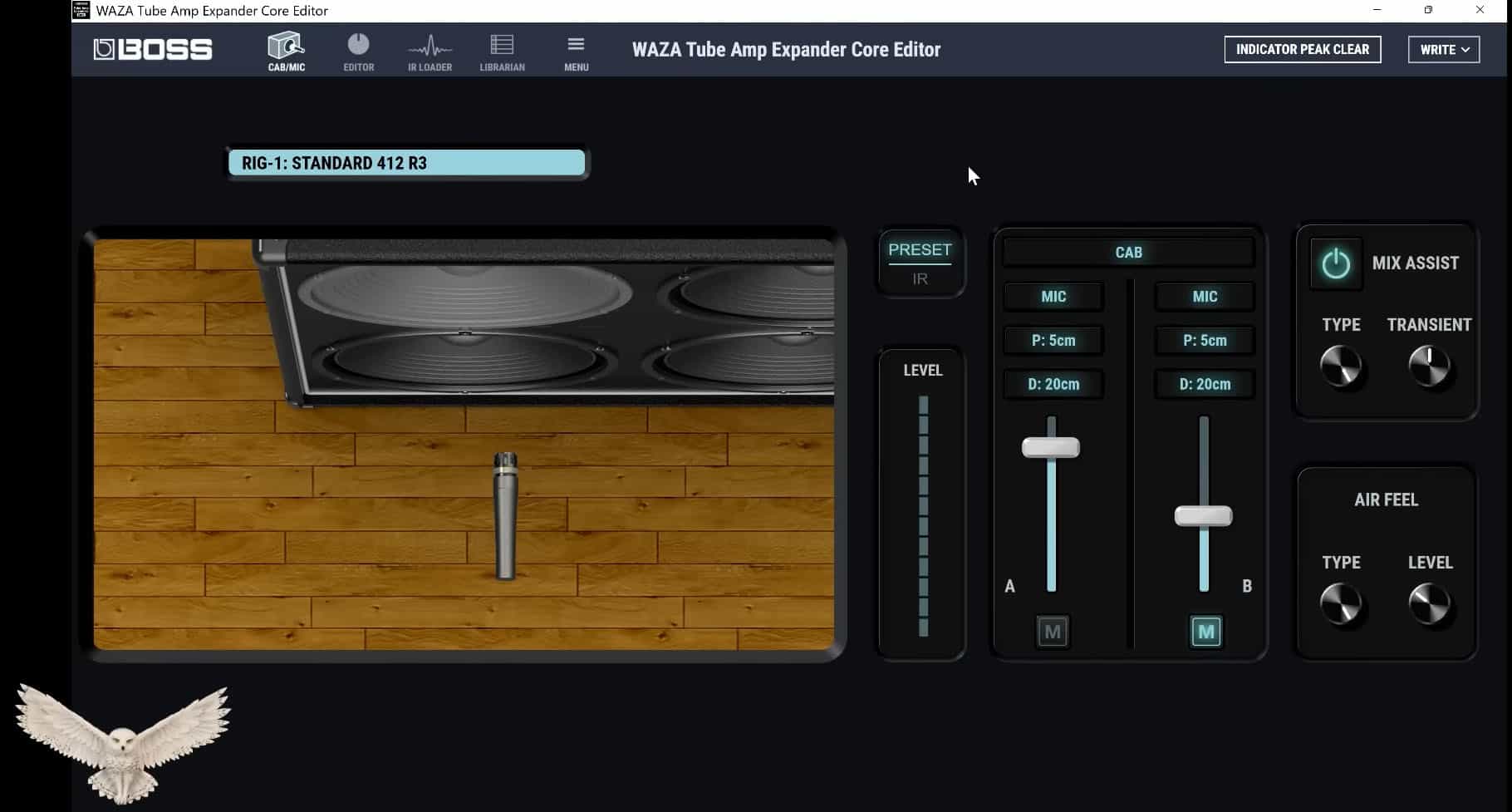
The Cab-Mic section of the editor you can choose various IR's that are available to you or a preset, and you can load 3rd party IR's if that's your thing from the IR loader section of the editor too and you can load up to 64 IR's. Its possible to move the microphones around for positioning and all that sort of thing. You can also change the type of microphones. For that shown cab on the screen there are a choice of cabs in the software. The microphone choices are also about 6 included in the software. There's a mix assist and also that 'Air Feel' can be adjusted in this screen at the bottom right - for type you get studio1 or studio2 and the level of it can be set also.
Editing
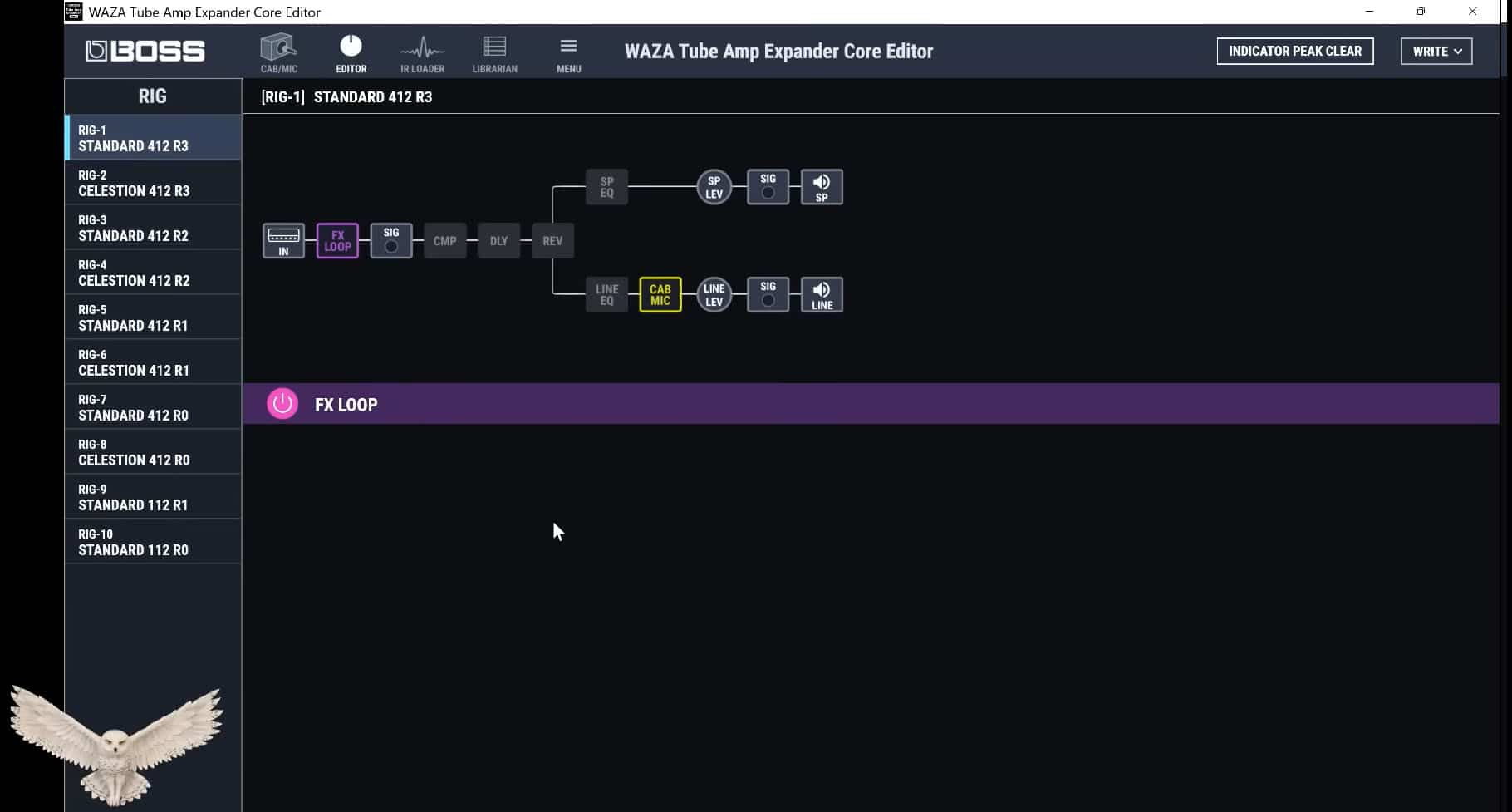
The editor looks familiar and it should do, its the basis of nearly every device out there these days. It has the usual icons placed along the audio path. Its a simple enough editor to use, but some things I never did manage to edit with my messing around in there. For me, once the core is set up I probably would never go back to the software. Once I have the tones I need and set up as I need it why would I come back in here? As you see though, there are the 10 position settings on the left hand side of the screen and easy to choose to edit.
There are a few other things you can use - like a compressor (just two in this version), there's a delay comprising of single, pan, stereo, analogue and SDE-3000. And there's a reverb too with hall1, hall2, plate, room1, room2 and spring choices. There is also a speaker EQ which choices include parametric or graphic, and there's a line EQ which has the same choices as the speaker EQ. There is also a speaker level control, and a line level control that can also be set in the studio paths.
There is, as I have said, a section for loading IR's too if you want.
Note that there ARE NO DEFAULT RIGS! Man you're on your own on this software. Choose any setting 1 to 10 and notice nothing changes. You might have liked a few example setups? Sadly Roland Boss did not care to create any.
Librarian
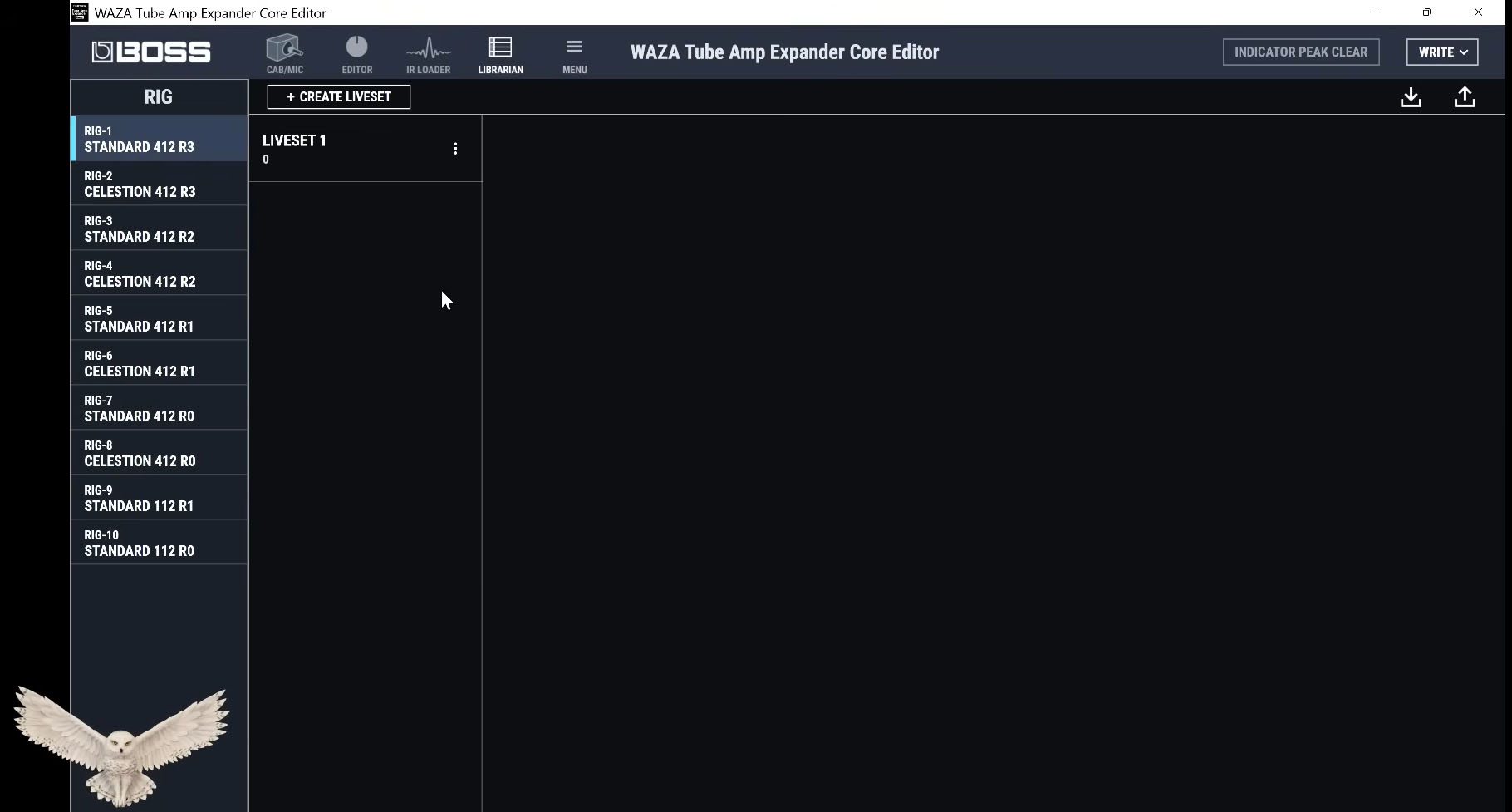
The librarian, like so much of the software could literally be in a GX-100 if you did not know better. Its all pretty much a standard these days and their term of 'Live Sets' sort of even confirms the standard vocabulary they use product wide now. Create what I would call set lists (my idea of Live sets) for different gigs etc. at your will :)
Settings Menu
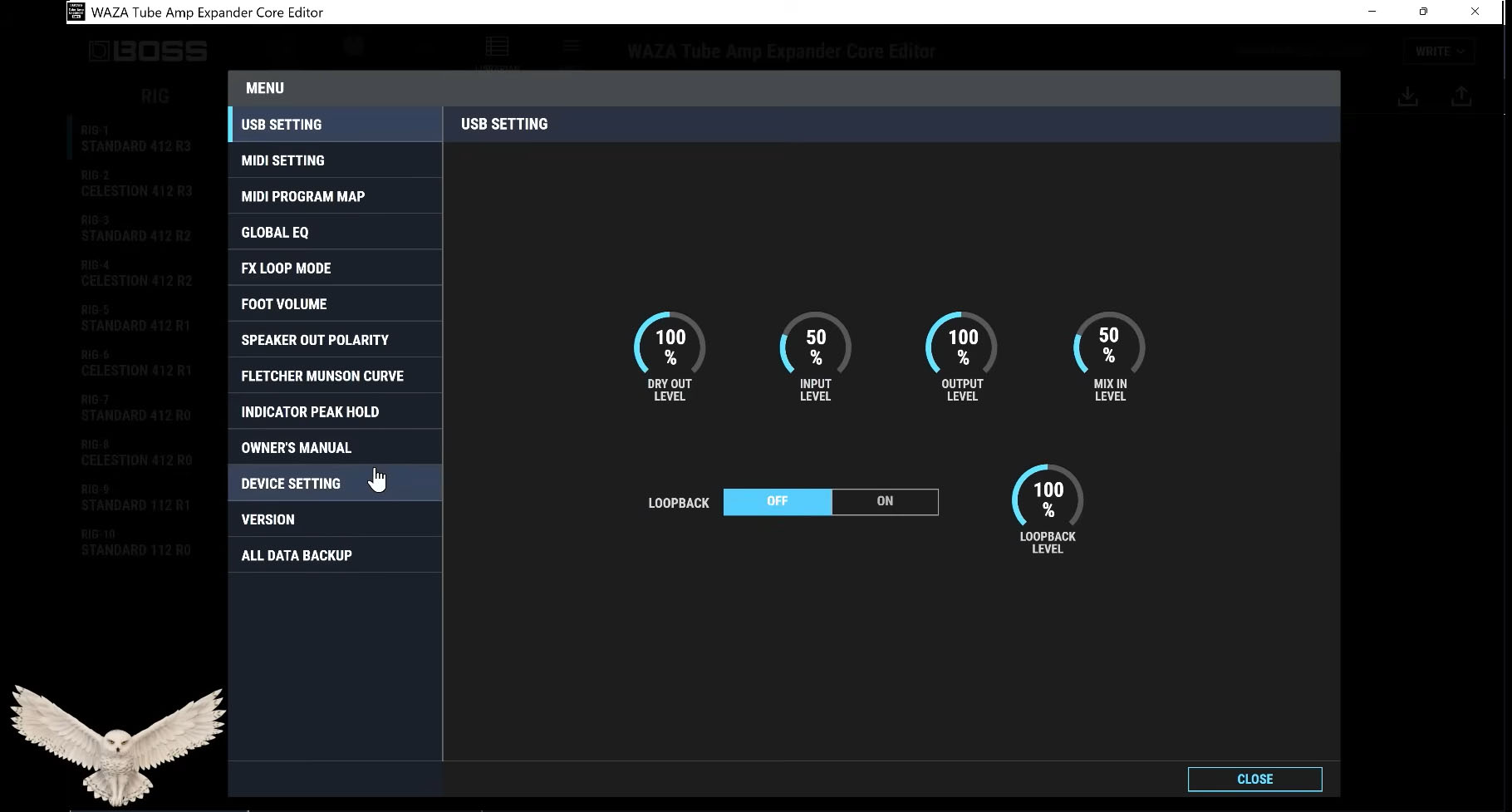
What can I say about the settings menu? Not a lot really, the menu is really pretty self explanatory and what you generally might expect in a Boss application like this one and like most of them these days. But the things you can setup include:
USB settings | MIDI settings | MIDI program map | Global EQ | FX loop | Foot volume | Speaker out polarity | Fletcher Munson Curve | Indicator peak hold | Owners manual | Device setting | Version | All data backup
So there is much to mess about with in the general settings screen but this review is only skimming these and just showing what's in the menu.
This really concludes the short section on the editor/librarian software and you will pick it up relatively easy. If you have never used anything like this, you need to learn about IR's, their role and that sort of thing then you can soon get in to it all.
The Phone App
The phone app is something you will love or hate. Me? I hardly use it, but it could be your best buddy!
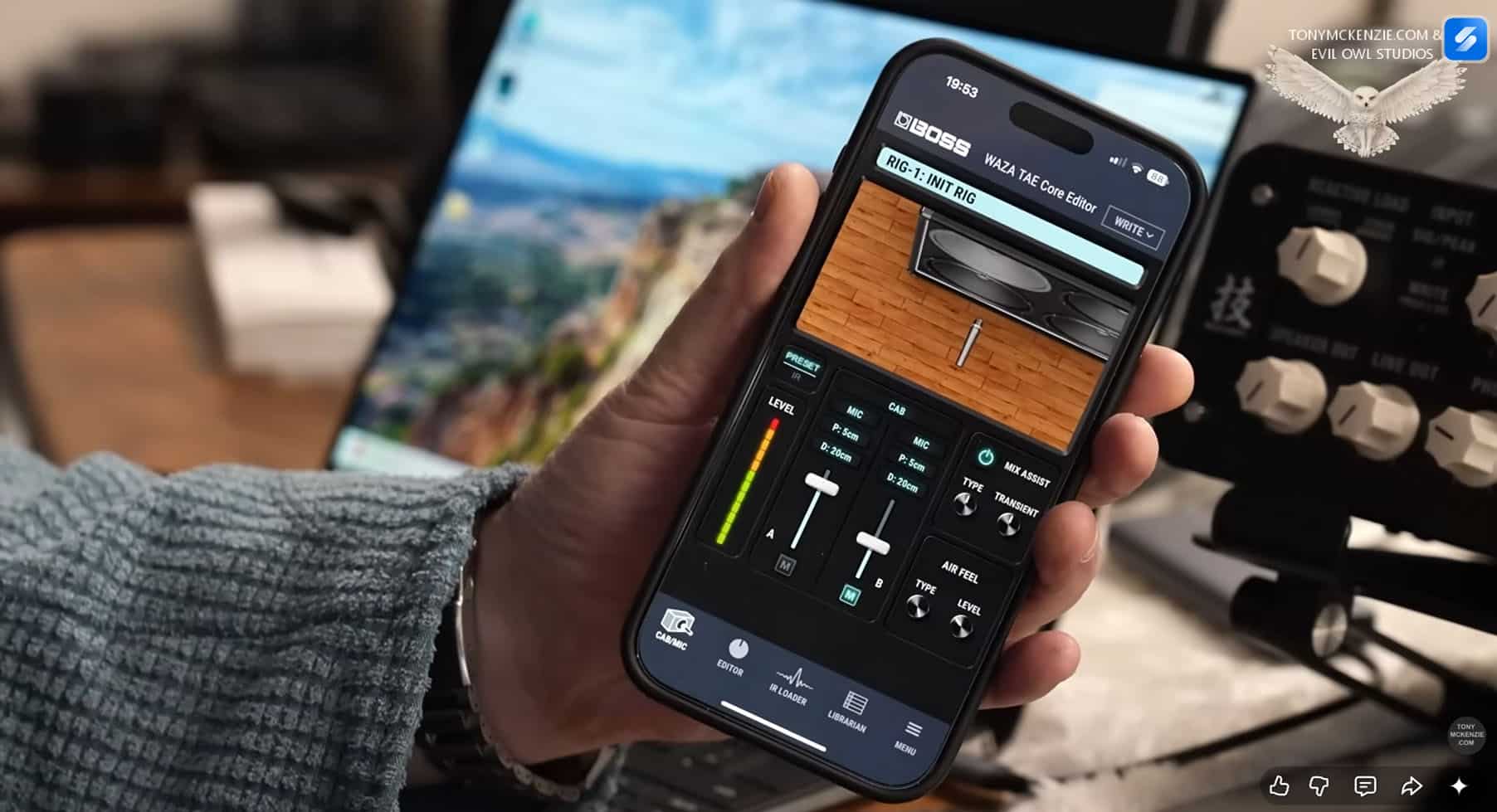
As you can see from the above images on a large screen Apple phone it all looks nice (rather like the PC app really, But that image on the right as shown had the audio path editing and I could not make it flip no matter what I did - it's clearly the wrong axis for landscape mode :( Now that might have been me, or the software may have now changed but I thought I would mention it.
Remember you MUST have the optional Bluetooth interface to make this work! Other than that its basically like the PC software. This concludes the App section.
The Tony Score?
So what score does the Boss Tube Amp Expander Core earn?
I'm ALWAYS critical about the gear under review when I decide to give a genuine score that guys (and gals) can use to make informed decisions about a prospective purchase. Sincerely I don't want to mislead anyone. I have used the TAE Core with a Ceriatone Trainwreck Expression all access, and I can tell you, that amp is extremely loud. Its just 30 watts or so, but to get the best out of the Trainwreck you have to NOT use the master volume! Man its loud. However, when you play it like that then that amp will sustain literally all day. It has that classic amp feel and can be crushing. It is completely inspiring to play through it, but of course you could soon be deaf playing it flat out.
But once you introduce the TAE Core honestly it turns the Trainwreck in to one of the best sounding amps for sustain etc. that I own - in other words the TAE is essential to get the best from that amp and record or to play live, where otherwise I would be thrown out of the place for excessive noise.
So I score the TAE Core at an 8 out of 10. Why only an 8 Tony?
There are TWO reasons why I give the unit that score, namely:
- If the amp you're using is 100 watts, and the TAE is 100
watts too, there is zero room available if the amp happens to
output more than 100 watts. You might tell me that's impossible,
but in reality we make mistakes. Take the Jackson Ampworks
amplifier I have, I always thought of it as 100 watts, but
Jackson had commented they got 'up to 120 watts' from that amp
on occasion. I can see it now, Use an amp outputting any more
than 100 watts and you're staring failure in the face.
- The second reason this device is 'marked down' a little is that annoyance of having to pay for a Bluetooth interface. It's quite funny, and as they have a phone app there really is little excuse, especially as some of the knobs for reverb, compressor, delay for example are NOT on the front of the device. At a gig how would YOU change them if needed to? The answer without that Bluetooth interface, is that you wouldn't.
Now if you have a 50 watt amp or less disregard point 1 and give the unit a 9/10 no problem, but for point two you might still be having to buy that interface. Come on cost in manufacturing to have installed that BT interface? Probably $10 or less.
So for my criteria it stays at an 8/10.
Warranty
When I checked I only found a 1 year warranty when I looked for this device - I could be wrong, but something that is on the receiving end of 100 watts might have been a little better with a two year warranty. I would not realistically see this unit failing overnight so to speak but its when nearing that 100 watts power being fed in that maybe there could be issues. I'll find out in due course.
One thing that you might seriously consider is to buy this TAE Core from one of those dealers like Thomann (this is not a recommendation) that offer free longer warranty and in the case of any device that gets this sort of potential hammering I would suggest you buy from them. If someone only offers the '1 year warranty' then look elsewhere.
Summing Up
Here I give you my opinion and advice if it can help you great and if not, well I tried!
Well, this is a device that's around about £600 to buy in the UK. So, it's not a hyper cheap device. And, you know, you can buy some very cheap but some that are not as good as this one. And they can calm your tube amp down, whether they'll do your tube amp any good is another story, and those other devices often don't include what this TAE core has built right in.
And you've got 10 settings and you can switch between the layouts with MIDI and stuff like that. That's great if you want to spend a bit of time doing all that, but it does do another few things that you might not have considered. You might have an amp that hasn't got an FX loop. And if you use this, you can now have an effects loop right there. So it's got that feature. And I'm not sure I mentioned all these features and benefits earlier, but I'll just mention a few in passing. If you've got an amp that's only a 20 watt, say you got a 20 watt Marshall or something like that. There's lots of 20 watt amps these days. But if you needed it to be 50 watts, well, you can push the 20 watts into this and you can fetch out the other side 50 watts if you want to - its a useful feature for sure.
This Boss TAE Core is a Wazacraft design and quality which is the highest quality that Roland Boss make by the way, so expect something special when you buy one.
It's all interesting really. And for somebody like me, bear in mind this is sort of studio environment friendly. This is quite a useful tool. Well, indeed, in the way that my other full sized TAE is. It does get used and uh you know if you want to get certain tones, you want to get an amp cranked up, well, you've got to have one. But even in the case of that Ceriatone train wreck express amp, I can tell you, it's a 30 watt amp, but it can be very, very loud if you turn everything right up. I remember Nick at Ceriatone saying to me that, "Oh, you turn the master up, turn the rest up and you'll get, you know those tones.
So, this can be great in a studio environment or anywhere you need things much quieter. And what I like is that I've got a left and right out. And that relates to the reverbs and the delays etc. So its a recommended unit.
Thanks for reading this to the end as I have spend about two days creating the inside and out review.
Remember that this is a completely unsponsored written review and I actually did pay for this unit out of my pocket just like you.
If you want to please do subscribe to my YouTube Channel.
Links:
Listen to the Audio I recorded for this review
See the full sized TAE Review Video
Thanks.
© A B McKenzie 1997-2026. All Rights Reserved. All Trade Marks Acknowledged.