
Line 6 Helix Stadium XL offers many new features. But can the Stadium XL be the king of the amp simulators? Find out in this Inside & Out Review?
Line 6 Helix XL Amp Simulator Inside and Out Review 2026
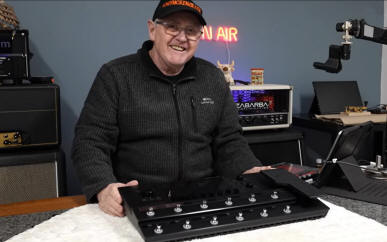
The Helix Stadium XL offers much but has the price to match!
Introduction and Preamble
The Line 6 Helix Stadium XL is reviewed here inside and out. I include the I/O, the controls, programming editor, the processor and chips, and loads of other useful stuff like warranty and more. I cover the majority of features (but not all) with the Line 6 Helix Stadium XL and I was surprised about the processors and chips inside the unit as well as the overall construction. The info says 'Made in China' but some PCB's stated 'Malaysia' so maybe its a multi build from different areas of the world. I was waiting for this device for months, and even after its release, some of the 'important stuff' (at least to me) was still missing (other reviews later will cover those features) and after a few firmware updates the unit is improved.
Its a bit sad really at nearly £2000 here in the UK that they took the decision to release the Helix XL without all the features originally stated - but those ARE being added slowly over time. If you have just bought one of these Stadium or Stadium XL units this video will likely help you to get around the unit, but understand this is a very close up in depth review and not some sort of training manual ;-) One thing I can say, is that the Stadium XL does sound better than the older Helix and in my opinion many of the other units out there but at the price it should! I also own a Helix Rack and the tones from that device are not quite the same. Don't compare this floor Helix Stadium XL with a Fractal Audio FX3 - they are different and to be fair the Fractal unit is older, and likewise with a Kemper V2 either as that IMO is just different. When you see the quality of this unit it does speak greatly of Line 6 and Yamaha in my opinion. So on to this newly written Helix XL review as of April 2026. Note that this written review IS long, but you might learn much about the Helix XL and it's associated models so it's worth watching. Alternatively watch the 1 3/4 hour long video I created!
The First Turn On of the Stadium XL
When you actually receive your Helix XL and especially if you are a previous iteration of the Helix floor pedal, you will notice that this replacement is a little smaller and that's welcome. In fact I sold my floor Helix some years back to buy the rack unit. Sadly as I write there is no mention of a rack which is more suited for my needs. In any case, you'll want to plug it in immediately and turn it on to see what your nearly £2k has bought. You might initially be disappointed!
Yes that's right, I turned on this one and it took a while compared to ANY other simulator I have ever owned - and that's a lot of them. So initially I was not impressed.
Firmware Update? Really? Already?
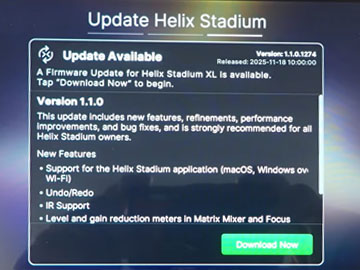
So I connected the Wi-Fi and without much hesitance up came the above notice. And as the Helix XL I had was version 1 (I think it was) that had to be carried out. The truth is as supplied with version 1 firmware the unit was virtually pretty useless. Don't mess ablaut - if there is a firmware update you can be sure that it IS going to enhance the unit dramatically to what it was when you received it. Carry out the firmware by doing EXACTLY what it says and don't make mistakes on this.
I also read and looked at other included documents at the same time as the firmware update as that time would otherwise been wasted. There did not seem to be a printed manual... something that reeks of saving money somehow. You might disagree. Disappointing when you have a device of this caliber I think - and don't even think of trying to read some online manual on a mobile phone while you're trying to figure out a problem at a gig!
Inside the Helix Stadium XL
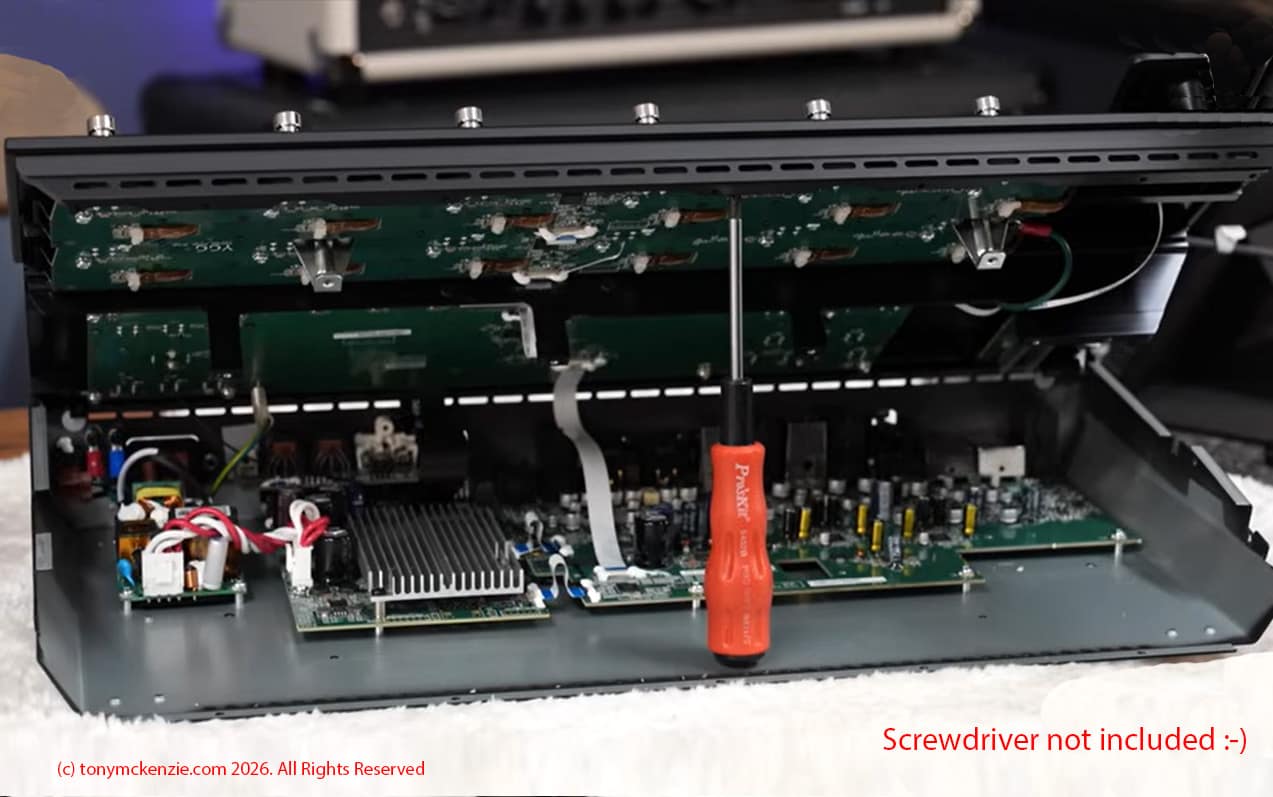
I always take a look inside every product I review and for good reason. Think about that Friedman JJ Jnr amp I bought that was botched inside on the PCB? Had I not opened it no-one would have been the wiser! So, the Helix XL was going to get a close-up review of the inside. This section will also talk about the processors etc. and support chips as well as the construction and general build of the unit. It's important to understand what EXACTLY you are buying, and if I find issues you might too! And of course its important to know the processing power for what is basically a computer (never forget it IS a computer). So I opened the lid and dived in.
Inside Look
Click for larger view
First impressions is that the Helix XL is not really even remotely like the 10 year old model although its not particularly any more complex mechanically. The build quality is very nice and as good as what you might expect from a company like Yamaha (who own Line 6). It's obvious that the PCB's are made on a machine, there is surface mount components, larger and other things on separate PCB's which is always nice to see, and it appears there are few areas where costs are the highest consideration.
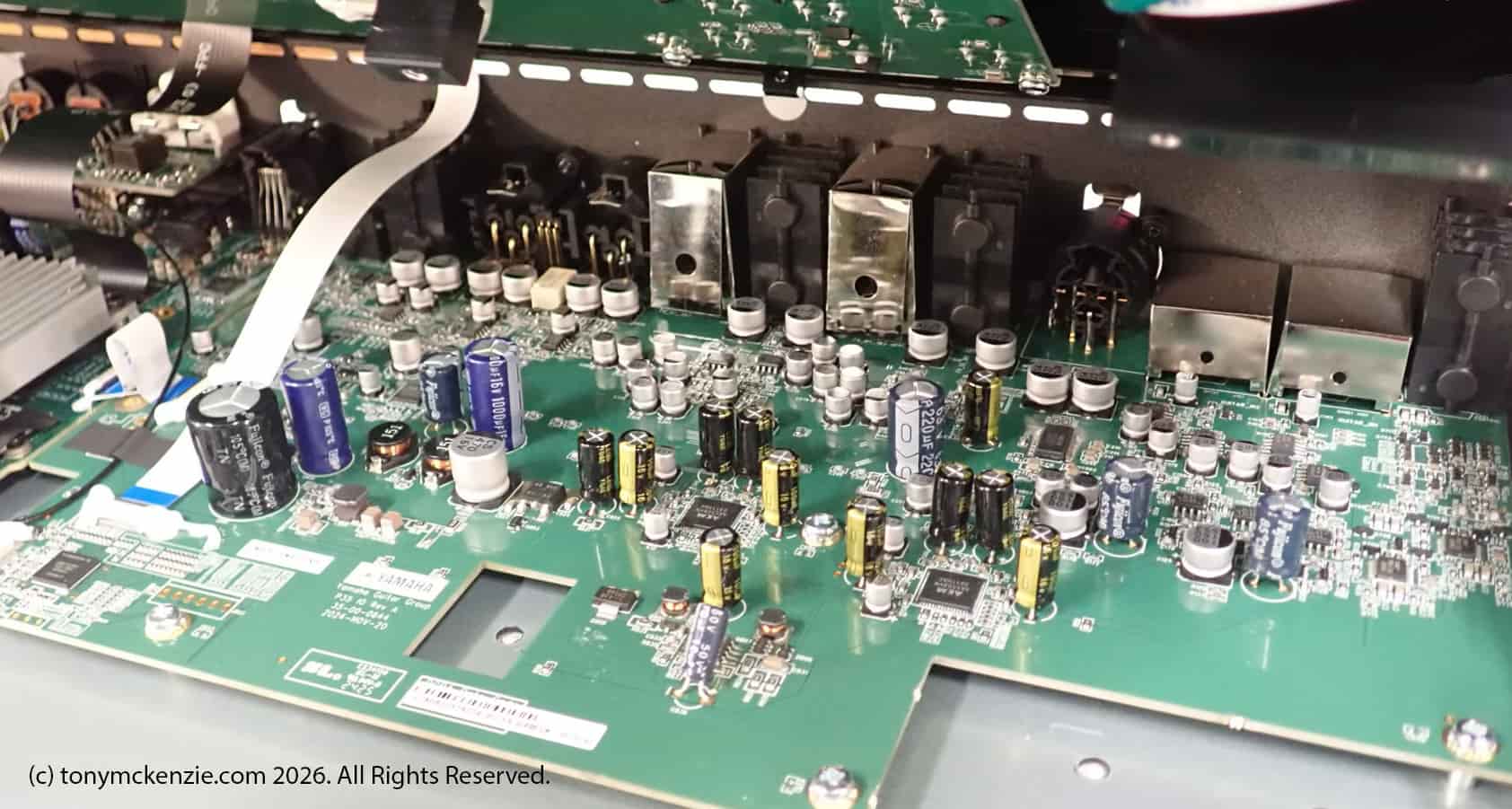
That very large heat sink clearly will have the main processor(s) behind it. The back board has many connectors that come out the back of the unit as I/O. But the connectors are fastened directly to the back board and might be subject to wear and tear especially if this unit was used extensively as it should be for that cost. How hard to change them later? Your guess is as good as mine really - but do bear it in mind.
Note that on the secondary larger board that there are many small chips to be seen and some will be more important than others that I'll try and cover in this section somewhere. Bear in mind that ALL chips matter - not necessarily because of what they are, but rather, are they getting towards end of life, or as I have seen in some cases already obsolete! Obsolete chips just trust me on this, are a major problem if any are in this unit. I can confirm from my research that the chips are all either recent or a long way from end of life!
Main Processor(s)
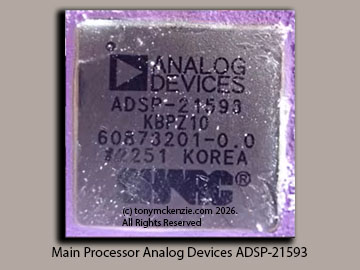
When I looked under the heat sink for the processors I saw this chip, some memory and that sort of thing and not really that much else... but i DID miss a chip that was on the processor board but I assumed they were the same. That is a second processor and sadly I don't have the information for that except to say that it related to graphics processing. However, no problem, this Analog Devices chip the ADSP-21593 is the main processor and one that is easily powerful for the job in hand. Its created as one in the series of SHARC processors from Analog Devices - se no more Fractal Audio bragging about their now older chip than this one is. This has more 'muscle' than theirs I believe. And BTW the ADSP-21593 chip if you buy 1000 pieces costs just $27.93 yes as cheap as that! I do remember Fractal at one stage when trying to justify its product that they claimed their SHARC chip was over $300... well you need to consider if they were 'telling the correct price' yourself.
For more about this processor chip in the Line 6 Helix XL you can download or view the PDF file. This is a dual SHARC digital dsp that doubles the performance of the older SHARC processors and leaves the others in the dust!
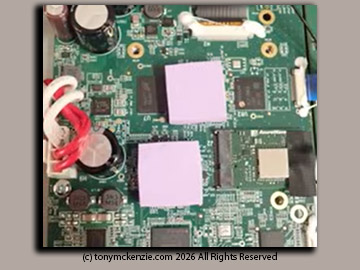
Note that there are two processors on the board and that the ADSP-21593 alone has TWO internal processors inside it. The other processor under the other pink cooling material sorry I did not photo and assumed they were the same. They were in fact different.
Other Chips Inside
Wireless Module AzureWave AW-CM358 Chip
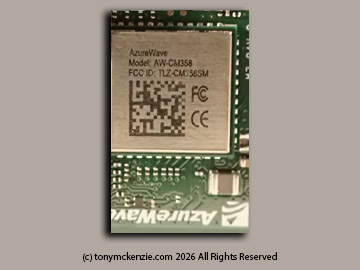
The AW-CM358MA is a highly integrated NXP 88W8987 chipset-based WLAN and Bluetooth module, which supports 802.11a/b/g/n/ac 1x1 and Bluetooth 5 combo module. It enables a high performance. Cost effective, low power, compact solution. The host interface supports SDIO for WLAN and UART for Bluetooth. Basically this module can really take care of all the wireless and Bluetooth for the Helix XL. Read more about the AW-CM358. I never found the online price of this module, but I doubt its a cheap one!
Quad Buck Regulator ADP-5054
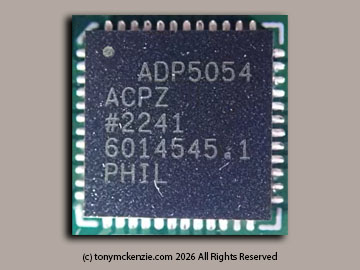
This is an Analog Devices product again and as you will see in many of these types of products like the simulators they often use other devices that are compatible with the main processor brand. IMO Analog Devices create a 'system' design with their chips and often companies use the basic design or enhance it to their needs. The ADP5054 combines four high performance buck regulators in a 48-lead LFCSP package that meets demanding performance and board space requirements. The device enables direct connection to high input voltages of up to 15.5 V from about 4.5 V with no pre-regulators. Here is a link to the ADP5054 PDF from Analog devices for more information. BTW this costs about £6.69 for 200 pieces and I doubt Yamaha would have an issue with that.
Kingston Memory on-board
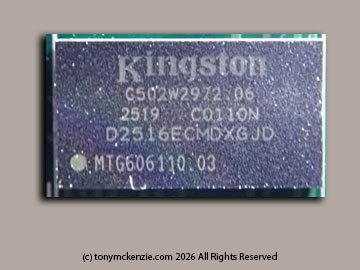
This Kingston memory was on the main processor board under the heat sink. I did not pursue this greatly because they are common in simulators from what I see, suffice to say I found just one inside the Helix XL.
FPGA Field Programmable Gate Array LCMX02
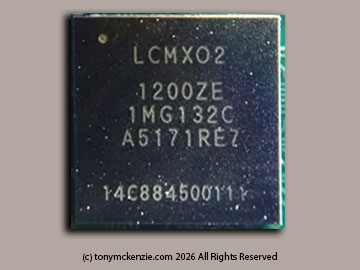
A gate array chip - used in the Helix Stadium XL and here are the full details of the FPGA LCMX02 Cost? £5.04 at Mouser!
Digi Analog AKM AK4458
This is a DAC chip or digital to analogue converter and there are a number of these it seems in the Helix XL. Very important chips for sure and affect the sound.
The AK4458 is a 32-bit 8ch Premium DAC, which achieves industry’s best low distortion characteristics by a newly developed low distortion technology. It corresponds to a 768kHz PCM input and an 11.2MHz DSD input at maximum, suitable for play backing high resolution audio sources that are becoming widespread in network audios, USB-DACs and Car Audio Systems. In addition, “OSR-Doubler” technology is newly adopted, making the AK4458 capable of supporting wide range signals and achieving low out-of-band noise while realizing low power consumption. Moreover, the AK4458 has five types of 32-bit digital filters, realizing simple and flexible sound making in wide range of applications. It has a 768k sampling rate, operates on 1.7 to 505 volts. Price? 500 for $4.66 each. Here's info on the Digi Analog AKM AK4458
Digi Analog AKM AK5558VN
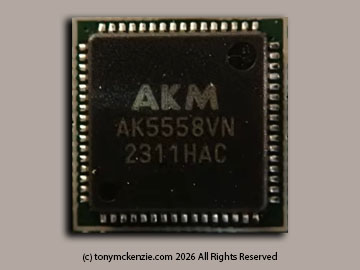
This chip is the partner to the above AK4458 and this is an analogue to digital or ADC chip. Its an 8 channel chip, similarly to the above chip 32 bit and 768k sampling etc. and if you buy 500 pieces its £6.23 each. Here's the PDF on the AKM AK5558VN.
Power Supply
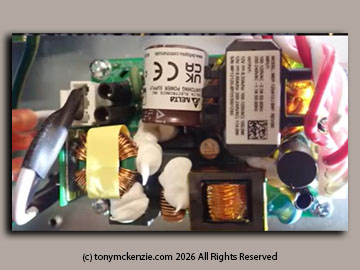
This is one thing that you should NEVER ignore. The power supply and for good reason. While I am not inferring that there is anything wrong with this power supply, some makers for example in China make power supplies, and they are then supposed to be 'approved', in the UK and Europe that means generally a CE approval and my guess in the USA FCC? However, there are a number of unscrupulous makers that mark the products as CE approved for example, then they simply lie and tell you their power supply is legal, when in reality it was never tested! Sometimes they even claim the 'CE' is representing 'China Export'! Power supplies that are like that are illegal and very dangerous. This one is a Delta 'open series' power supply, It's a 12 volt output and can supply 9.5 Amps they say and a 90 to 264 volts input. In any case this power supply is fine and properly approved.
In the video version of this review I did include a number of other important chips that you might want to be aware of, so if that's your thing then watch the video review, but be warned it is 1 3/4 hours long!
In any case I'm going to leave the other chips out and move on to the top controls on the Helix XL.
Top Controls on the Helix Stadium XL
Most controls on the Stadium XL are pretty obvious what they do, but I guess if you never used any tube amp simulator then maybe you would struggle. Here I discuss a few of the controls and hopefully help.
Output Volume Controls
There's regular out on the left, the XLR in the center and the headphones on the right. Just adjust and away you go! Adjust them of course with the larger knob underneath them. It is possible to link some of these different output volumes if you need to. And its also possible to disable an output by holding in the corresponding button on the top of the unit.
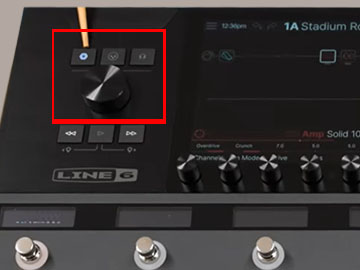
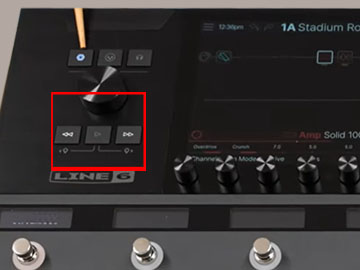
Transport Controls
Transport controls on an amp simulator? Yes you are right, there's a left, a right and a play button. Its also possible from a set list to move forward or back a track with these controls. Its also possible with the music to press either left or right and the play button to create markers in the track. It all sounds weird right? and it generally is, simply because other simulators can't do it!
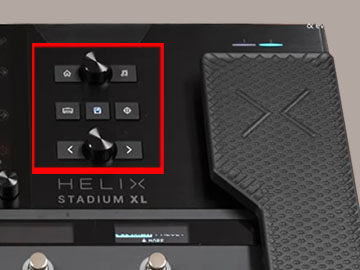
Home and Other Controls
The great thing about the Home control is that no matter where you are in this operating system (that's what it really is) you can't get lost. Just press the home button and you'll be back to the top level. Centre top can select presets from a list, and the right button with the treble clef is used to select a song from a song list - those again!
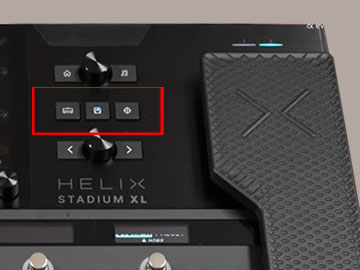
Middle Controls
Left chooses what amp you want to use from a list, middle is the 'save' button and on the right its an XY button that opens the XY controller. I'll cover the XY aspect of this simulator pedal later.
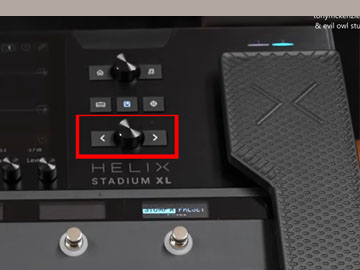
Blocks Screen Control
Press and turn this knob in the middle to open categories or press and turn to open the models and the left and right controls allow you to move between the blocks on the screen great for editing stuff.
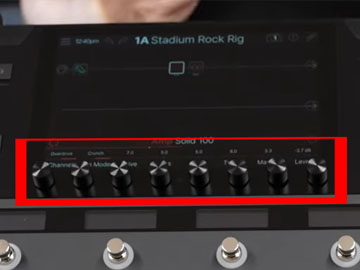
Multi Controls - Screen
There are eight multi control knobs just under the screen. These specific knobs are defined on the screen and what they do depends on what exactly you are doing at the time. They are a really quick way of enhancing then editing and much more - thanks Line 6!
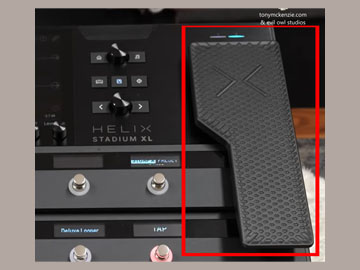
Foot Controller
The foot controller is a brilliant way of controlling almost ANY parameter(s) when you're playing a particular preset (I'll call them that for now). Its NOT some useless pedal on the Helix XL and can be one of the most powerful controls on the system. It has a switch too for turning on or off. Remember there are external pedal I/O on the back of the unit too if you have three or four legs and feet :)
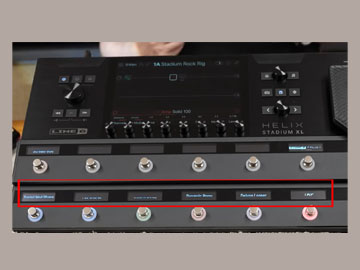
Scribble Strips
One of the great things - in my opinion, are these scribble strips. They are only on the XL version of the Line 6 Helix but you must determine yourself whether these and that foot pedal with some other benefits of the XL are worth it to you. IMO they are all worth every penny if you gig a lot. You can set the text to be shown and they are always a great help in use.
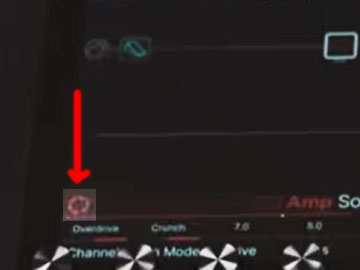
On Screen Focus Control
This really a 'soft' control that you choose from the focus icon on screen. It allows for very simple choice of whatever is selected and how the sound is affected. For example an amp chosen, can then have its tone adjusted by moving around a pointer so you can easily tailor the amp for what you want. It's applicable on far more than just an amp too! Nice images of what you are changing, amp, effect etc.
Rear I/O on the Helix Stadium XL
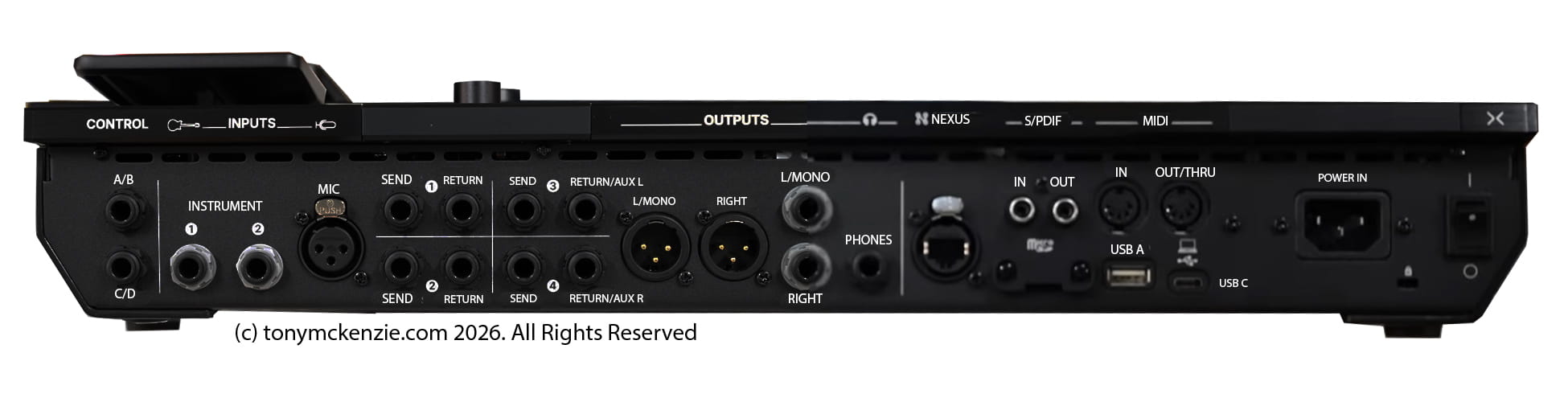
One thing is for sure, there is no shortage of I/O - inputs and outputs are extended and exceptional and in my opinion one of the reasons why the Line 6 Helix XL is one of the leading, if not the top guitar (but could be anything) simulator pedals on the market today. Lets see what's there:
The Overall I/O Design
As you can see there are so many I/O options on this unit it might be hard to think of another device like it. Fractals Axe FXIII may have more! But one thing to remember about these IO connectors is they are all on the board directly. That might be problematic in years to come, but to be fair, the older Helix seemed fine? Tell me if you know better! Lets see what's here... BTW click the image for a large view.
Control Inputs
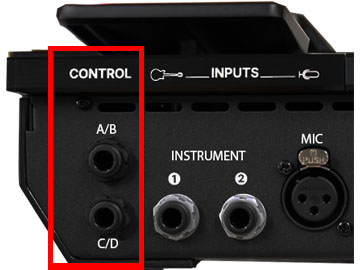
I mentioned earlier that there were a number of control inputs, and here they are. Yes there are inputs for up to FOUR expression pedals if you have enough feet! But you can add things like drum triggers or percussion pads and I'm sure many more devices too. These can also be remote amplifier control output - fully programmable of course.
Instrument Inputs
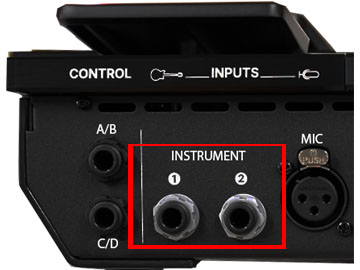
You can use two mono instruments, or one stereo instrument as input and you can select the impedance selection for these inputs. There is also a switchable 'pad' and a noise gate all again programmable if you want them on there. Note that there is also a Microphone in just at the side that has a 48v phantom power supply - all very nice!
Effects Loops & Aux Inputs
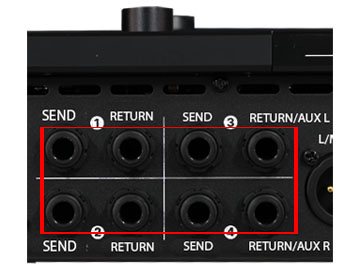
The effects loops are very extensive and similar numbers to The Axe FX III. These four loops can be mono or stereo so they support stereo stomp boxes for example. And create the 4 cable method for interface to an amp for example. And of course use as extra in or out's for drum machines, keyboards or anything you might need to input. You can use returns 3 and 4 as inputs for monitoring the house mixer as a good example.
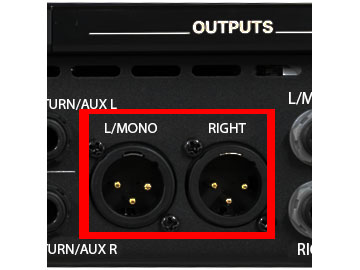
Balanced XLR Outputs & Unbalanced Out
These balanced XLR's left and right are great for studio monitors, house mixer etc. and of course have settings you can control. These are controllable by the top panel XLR button I showed earlier so you can change things if you want to. You can just about see those 1/4 inch (or 6.3mm) outputs too for non XLR use. These are similar to the XLR but unbalanced. Again adjustable from the top panel button I showed earlier. Use left only on either XLR or unbalanced for mono.
Headphones Out
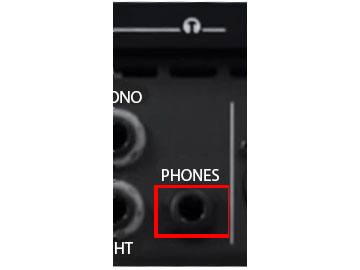
Yes around the back of the Helix XL is the headphone socket. Personally I don't like it here, but you have what they give you right? Take note that I found the output levels were quite compatible with a number of headphones. Sometimes you get very low output sockets - often related to studio impedance headphones, but this output was OK. Volume is, again, adjustable from the top panel button with the headphones image on it.
The NEXUS I/O
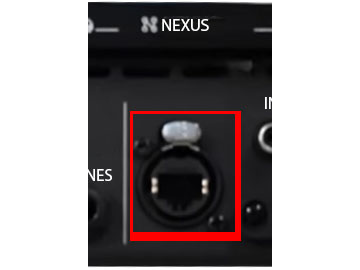
Now then, there's nothing like the future right? Well enjoy, because this is a port for the future that Line 6 claim will have various peripherals for external connection. They are a little vague about it, but don't worry, when it can be used you'll be the first to know 0 so they can sell you more products :)
Micro SD Card & S/PDIF
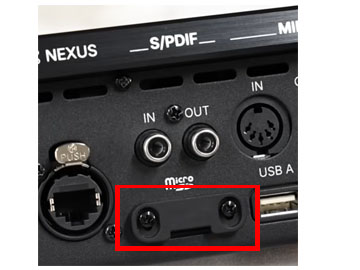
This included SD card can be used for playback and storage of loops, clips and much more. Note that the card can't be easily stolen and you will need a screwdriver to remove or install it. Maybe I'll take another look at this later... or not! Note also those S/PDIF connectors too. Use 75 Ohm coaxial cables for this. Use these digital connections for external devices that support the format.
MIDI I/O
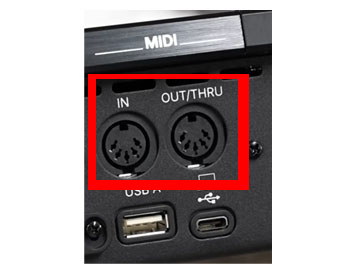
These 5 pin din MIDI connectors are a welcome sight especially bearing in mind that the XL is a relatively new device - and that they have not 'dumped' the 5 pin din for USB as so many companies have. Most guys know about MIDI and great to see these standards on here.
USB Connectors
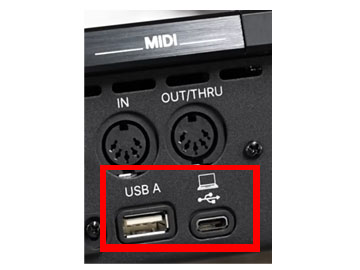
The USB A can be used to connect (believe it or not) a internet (maybe Ethernet) interface for the Helix XL... who knows why? The USB C on the other hand is great, an 8 in 8 out 24 bit 96Khz interface to a computer! You'll be able to record what you do :) There's also a re-amping feature and USB MIDI for those that can no longer bring themselves to use 5 pin DIN MIDI. They claim it can interface with this port for mobile phones but are vague in what they say about that. Use this USB C port for connecting to the PC when using the editor software later in this review.
Final bits...
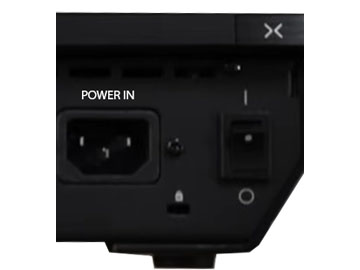
Obvious what the power in does! Its a switched mode input so will likely work for your country. Great for the UK for now, until Milliband the mad person stops the power in the UK. Also there's an on/off switch thankfully. Lastly there is a Kensington slot so you can help to keep your Helix XL and stop others from stealing it!
Lastly For Hardware: Approvals and Certification.
Having looked closely at the Stadium XL I can confirm that the CE approvals and RoHS compliance are highly likely to be real. I mentioned illegal hardware from some makers that just 'make it look like' they have these safety compliance standards and the RoHS ensures lead free components etc. but make no mistake that this device is built to a very high standard and I don't believe for one second that Yamaha, or Line 6 would have it any other way.
This concludes the Section for the I/O and what a great device the Helix XL and associated model it is. It might be hard for you to think of some interface that is not obsolete that the helix does not have - well I can't think of one. And somehow, it does, when you learn all about these options already there as standard on this unit, you realize just how great the Helix series really is. Its a big improvement in my opinion and who knows what the NEXUS interface may well one day bring to this unit.
A final look at the IO board - click the image for larger view
Overall Build Quality of the Helix Stadium XL
This is an expensive simulator come effects processing unit of that there is no doubt. But as I looked closer and closer, I could easily see that there had been extensive time involved in the internal design, the chosen chips, the other component quality and overall I did not really see anything that was untoward for a device at this price. As for what level of quality is involved? Well, I have to say that the hardware gets a genuine 10/10 for what I received so in my opinion I have no hesitation whatsoever in describing the Helix Stadium XL as one of the best made and designed devices I have ever looked at. Hardware only of course!
Editor Librarian Software on the Stadium XL
So what's next you may ask? Its time to take a quick look or at least some comments about the editor software, but hold on, I won't be spending hours on it, just laying out what worked for me and what did not while I'm reviewing the Helix XL. The Helix software over the years has expanded and offered many more features than the early release of around 10 years ago that's for sure! Later, when it was falling behind other brands (and trust me it had), came the snapshots as they call them, among other things, and those snapshots allowed eight different settings for one preset which changed things forever for the Helix series. So let's discuss the editor.
Before we get going you have to connect the PC to the Helix XL with a USB C cable between the two, or by using the USB C to an older type A USB connection on the PC. I recommend the USB C to a USB C connection. Then you need the Helix XL to be connected wirelessly to the internet. Note that both devices worked flawlessly when they both went to the same network. I have had issues with other brands many times, and with this setup when there was a Proton VPN active on the PC - I had to disable that to make the system work properly.
Anyone who has owned a Helix in the past will know the Editor Librarian software quite well. Even with the new hardware, there are so many things that are similar or the same and that's a good thing. As with most decent editors changes occur immediately on the hardware as you use the editor.
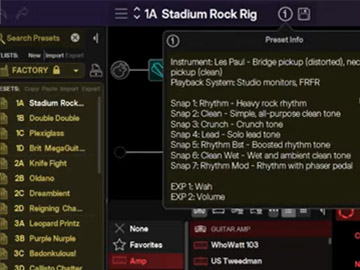
Its easy to see the info from a preset and the important snapshots associated with it, as well as other things like pedals are assigned etc. and I like this because you really don't have to think much about what is or is not setup.
And there are the usual things like choosing the factory presets, user presets from the left of the screen so that you can easily try them or modify the original presets as they come. Make no mistake that the factory presets are good, unlike some other gear I have tried over the years, but its always good to 'make them yours' and then save them as user presets, or of course you can start from scratch to make a new preset. Here's a screen shot and click it for bigger image.
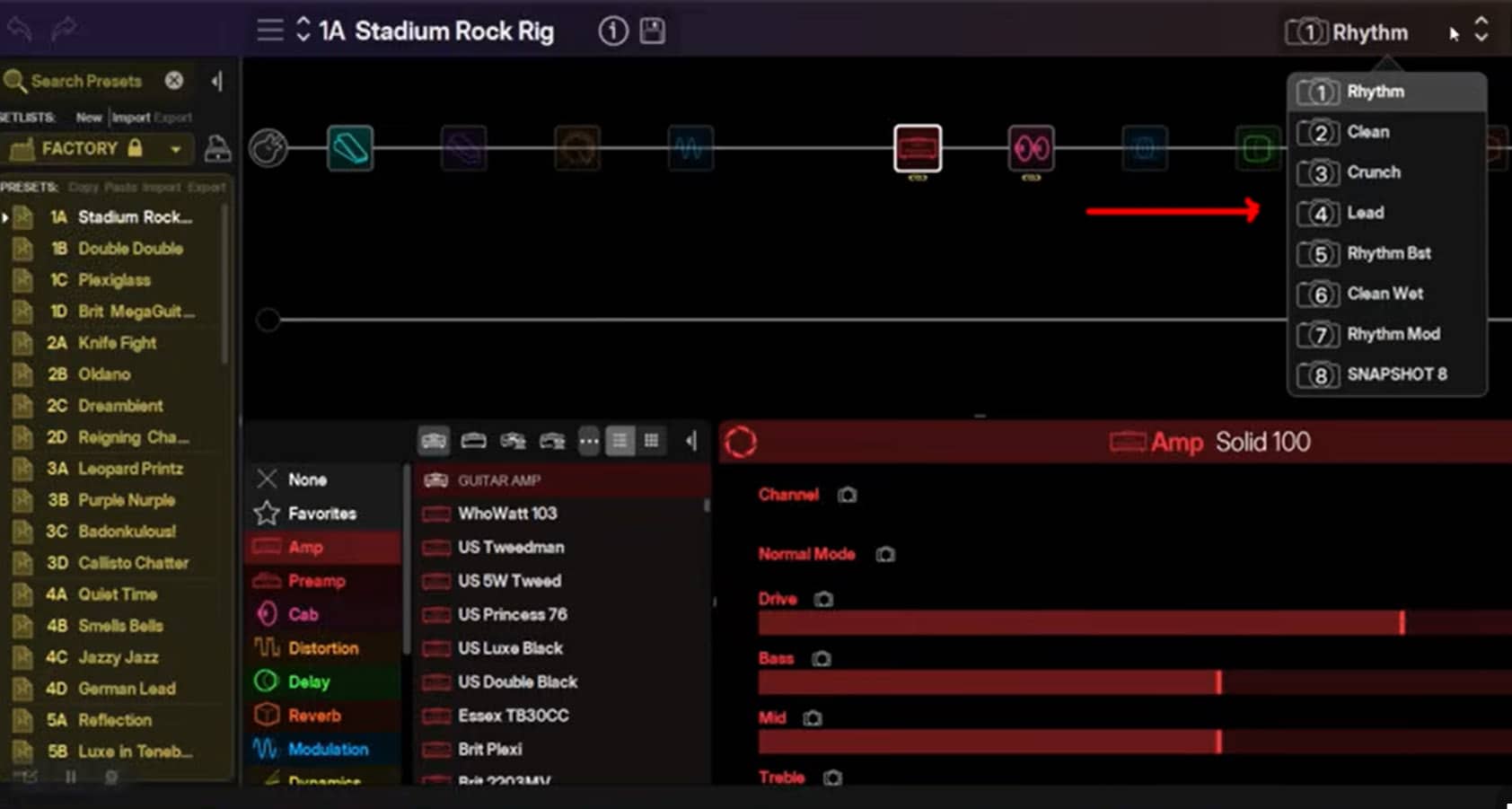
I refer to these snapshots because for my money, they offer one of the biggest improvements in recent times, and thankfully the new Helix Stadium XL has them in this software. The software supports all of the editing abilities in the editing window and there is nothing really dynamically different than in other versions and users will soon get a grip of it. However, compared to the Axe FX series this is so much less complex, they are worlds apart. And remember that there is 'online help' if you fancy trying that, but as for a manual... keep looking. And scarily, if you are not completely conversant with the operation but no 'online' at the gig well forget it!
Typically the IR's for speakers are well supported and you can import your own if you need to. In fact the choices of everything, not just some IR's, things like amps, effects like delay, distortion, modulation, dynamics, EQ, pitch shift and so much more are all choose able and editable just as easily. And that's really again one of the best things about this editor librarian, its just so easy to use!
Another thing I liked was the library templates! What do you mean Tony? Well, you could create settings and more, create them from nothing if you like, but the librarian has templates to take away much of the hard work.
Librarian Templates
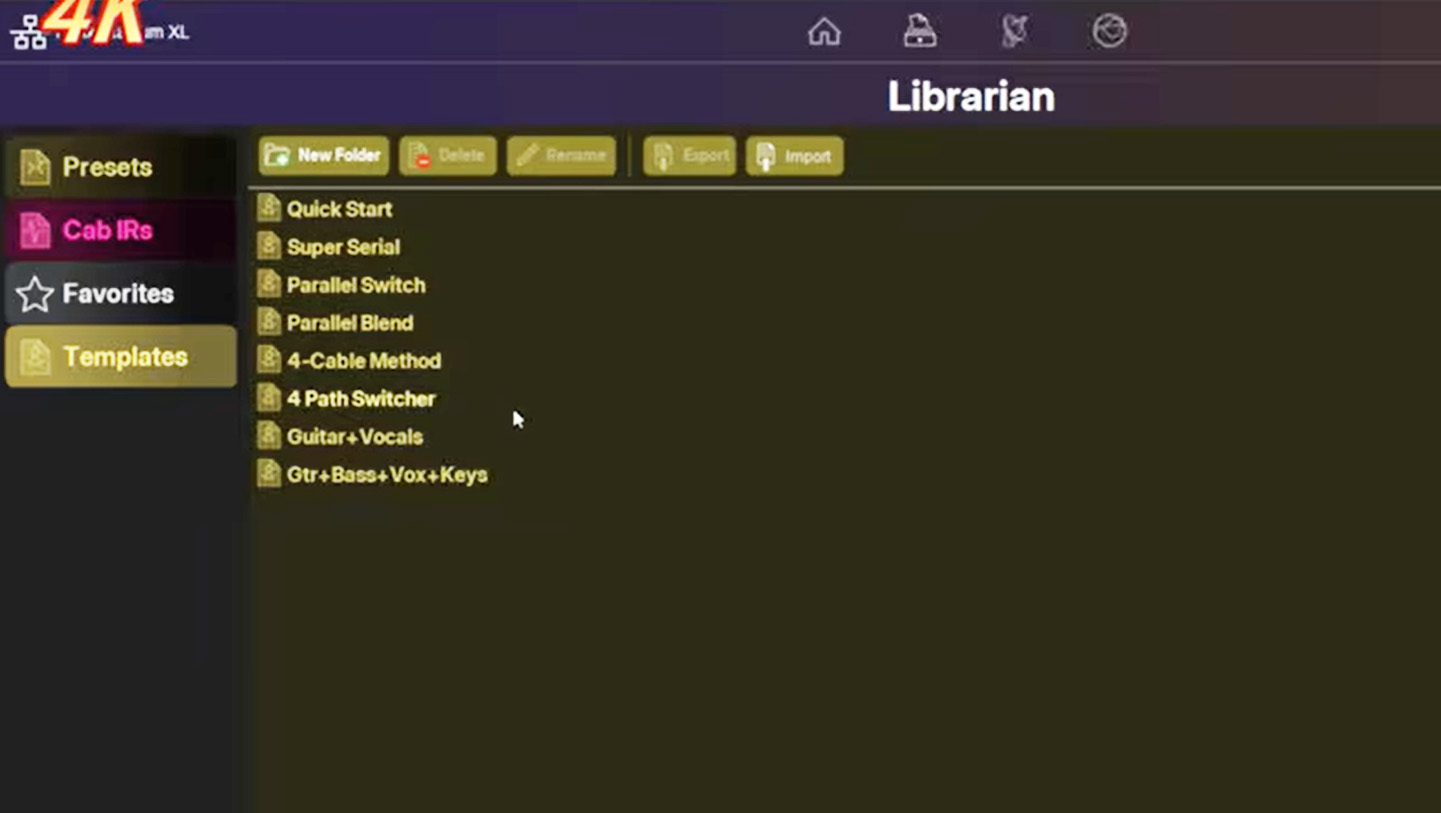
It's easy to create a 4 cable method setup, a 4 path switcher, a parallel blend, guitar and vocals setup and more. There has been much thought by Line 6 it's obvious and the easier they make this unit work the more users they will pick up, make no mistake about that!
Command Centre
The command center is a very powerful feature that can allow you to control so much. Things like: control MIDI cc's, change external presets in external pedals, guitar amps, synths, drum machines, or even other multi effects units. Send MIDI notes to trigger sounds or more, and in here you can use the external amp switching features like changing the channel or reverb on or off etc. This control center has qwerty key strokes that can be sent over USB to control any software you might also be using! The features go on and on and I'll leave it at that for this section, but remember the deeper you go, the harder it gets!
Global EQ
There is a global EQ ability available. Now this can be very useful if you gig with the XL. Why? Well think of it this way, every event has its own audio 'feel' (I'll call it that) and its likely necessary to create a global EQ for that particular venue. But use that in a different venue and you might find it sounds really bad. Can you imagine trying to set up each and every preset for different venues? Don't try it! What you do, is simply create a global EQ for each venue, save it and apply it each time you gig there. And just in case you don't know, those global EQ settings can be applied to the three outputs separately so whether to the mixer, speakers or other out you have it handled.
Song View Mode (Showcase)
One of the most important things to me, was the inclusion of a Showcase or song view mode. Initially this unit was delayed and the song view mode was a figment of their imagination... sadly. Yes they sold the XL without the song ability. While I have tried it on their first release of it, my personal view was that it seemed rather 'clunky' and a bit of a 'disjointed junky' affair that still needs work to get it properly fluent with the creation of music in the way that I might well use it. I think right now its a 'work in progress' and I'll leave it at that, suffice to say that I will review this Showcase or song mode, its recording and much more in a future review when its worth showing. Have you had success with it? Let me know.
Last comments about the editor? Make sure your VPN is turned off or you might too go around in circles trying to understand why your wireless is not connecting!
Focus View
There surely has been much made about the focus mode on the Helix XL, with it's fabulous graphics (that actually took a graphics processor on-board to make that happen) on screen and surely they are impressive and I have not seen anything like that on any other device that I have looked at to date. But graphics are just graphics right? Well that's an opinion, but they sure do present the device in a way that other simulators have not to this level.
However, I want to draw your attention again to that focus mode and whether its just some silly gimmick or not.
It's such an easy thing to get to, just choose the screen icon on the device (whether amp, effects etc.) and you will see the chosen device shown in full graphics, If you want a different thing to focus on, just go to the editing window on the main screen, choose what you want, then hit that focus icon. But notice from here as well as the nice graphics, that there is a cursor in the center of the screen:
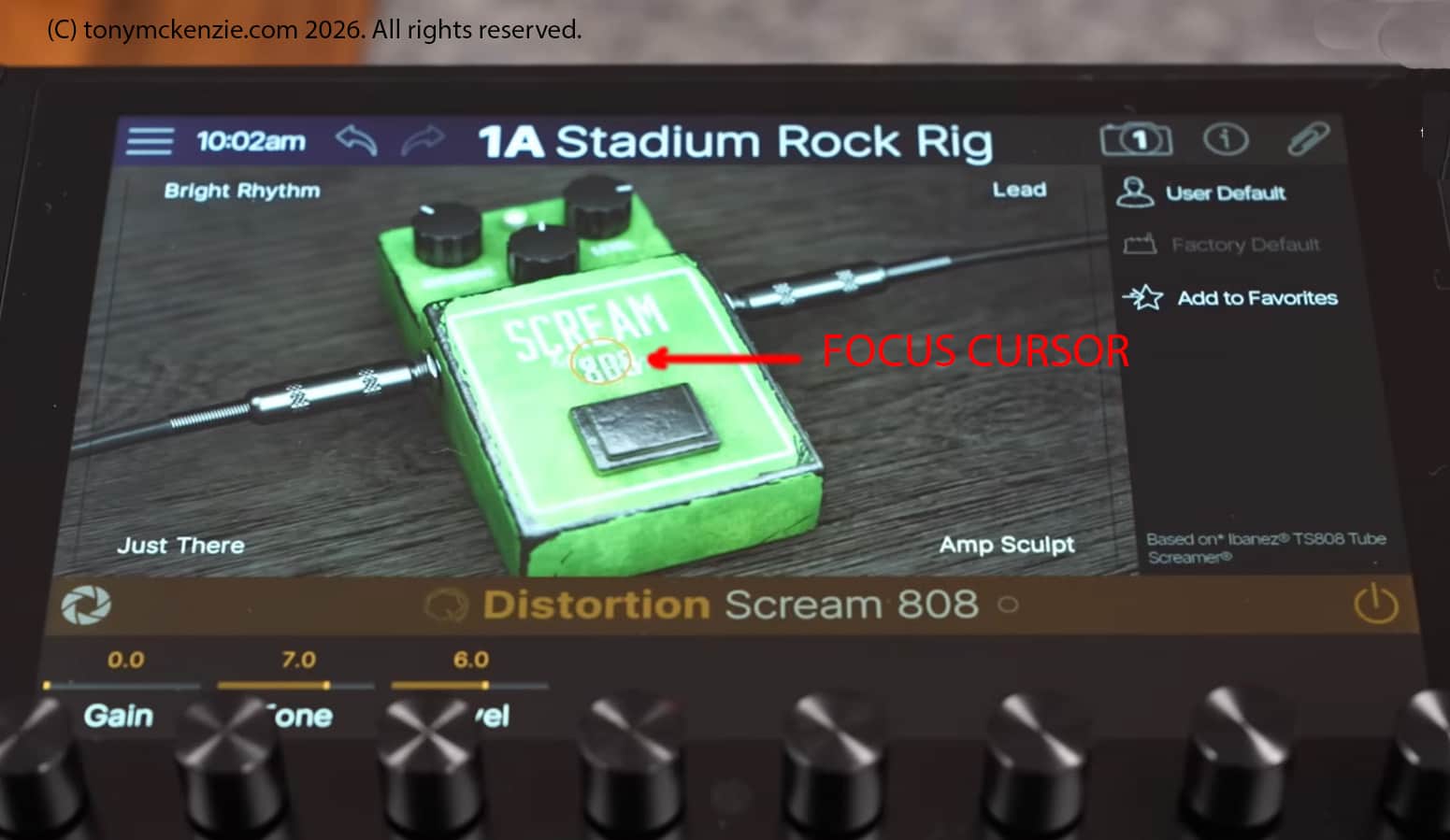
If you click the image there's a full size screen showing four areas:
- Just there
- Bright rhythm
- Amp sculpt
- Lead
You will see that in reality the cursor sits exactly in the middle of them. Moving the cursor around the screen (even with touch) changes the effect of the device accordingly and you will hear the difference immediately. This way you can actually 'tune' whatever device you want to focus to YOUR exact needs without effort. Note that the figures above the 8 knobs will change as you focus the part because that's what the focus does - it changes the parameters on a number of screen knobs all at once! So if you don't want to faff about all day, use the focus view to set up whatever tones you want. It is far more than 'just' graphics.
Hype Mode on the Helix Stadium XL
Ah the HYPE mode. What were Line 6 thinking of? Using a word like that in my opinion degrades the Helix XL. This unit does not need ANY kind of hype to win the race of amp simulators to the top. It was silly and childish then and it remains a silly and childish word to use now. In any case, the 'hype' mode was developed to change the preset to a more discerning tone - or what I mean is that sometimes the actual preset can sound 'wrong' compared to the original especially in a particular setup its listened through. So they included the infamous 'hype' mode to adjust the sound to a far better representation through the equipment you're using - at least that's my understanding of it all. The hype knob adjusts what's going on 'in the background' that you normally may not be able to control. It sounds a good idea, and it is! But 'hype' it certainly is not!
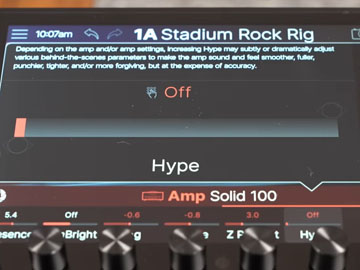
Getting to it is easy too. Scroll the bottom 8 knobs to the left on the main screen and there it is at the end - the hype control. You make up your own mind on this one and do let me know what YOU think about this weird control.
The XY Controller
So what on earth is an XY controller? Basically the stadium XL screen can be used as a large performance based touch controller where one or more parameters have been assigned to the X or Y axis - hence the name. And each axis can be configured to transmit MIDI CC's via the command center we looked at briefly earlier in this review. Understanding the control center is key! And don't confuse the 'focus' view with the XY controller even though they look sort of similar. Notice that ANY parameter from any aspect of the unit can be assigned to an XY axis. Remember this. Focus mode is for control of just one block, while the XY control is developed for multiple control of more than one block during a performance - an XY touch screen if you will. If you have a use for the XY controller (some guys do) then it might well all be simple to you, but for me? Well I don't usually use stuff like the XY controller and I doubt I'll ever use it unless something dramatic occurs the 'make me want to' use this controller. Right now? No thanks.
Made in China? Is this a Problem?
While we may be aware that this Stadium XL is made by Yamaha, it might be less known that it is in fact Made in China. I can hear some of you right now telling me it makes no difference. Well that can be true, but it can also be entirely wrong, depending on the maker themselves - some makers are less critical than others when it comes down to quality.
But think about this, are the makers 'passing on' the savings they make by manufacturing this device in China? Think of Apple, their products have been also 'Made in China' too, and the quality certainly did not suffer because the maker was a very good manufacturer. But it was, make no mistake, all about reducing the cost of each unit so that it could be sold at a 'better' price OR to increase the profitability further for the brand. Think about this, if the unit was actually 'Made in the USA' would the cost be higher or lower than the 'Made in China' unit? We would all probably all agree that the USA build would cost more because of increased costs compared to the Chinese build. So why do we end up with a Stadium XL at a strikingly high price? Its a good question and try to answer the question yourself. Some will insist - its the software that costs, or the R&D etc. but in reality wherever the hardware is made those other costs are often the same.
Consider that the old Helix today can be bought for just £999 and is that £1920 (April 2026) for the Stadium XL therefore somehow too high? I'll let you mull that over and I'm sure that you can tell me your opinion via the contact form :) or on my YouTube channel. But the making of the Stadium XL in China has had no discernable effect on quality and that's a fact. The question however, of value for money becomes an entirely different thing altogether. Ultimately we still buy the unit.
So why would I use demo presets to test this Stadium XL?
When I review any musical item that has a preset or many presets supplied by the maker, I tend to look VERY close to exactly what they supply. Think about it this way for the Stadium XL, Yamaha Line 6 are experts at what they do. They don't create a unit like the Stadium XL (or the whole series) and then just create rubbish presets. Far from it, they take lot's of time and invest big money in to those designs of presets. Makers want their equipment to be breathtaking when you first turn on the device and give you an experience like no other. Whatever your view on the included presets, make no mistake that they are honed to perfection - at least to the perfection that the maker says are the best you can get from the stadium series! This is why I always choose the factory presets for testing the audio quality etc.
However, as most readers will know, audio is always subjective and what's great for one musician, that same sound might be far from perfect to other ears. As a reviewer there is no pleasing every reader from personal conclusions in any review. But one thing is for sure, whatever the outcome from the presets, I will always report what I hear. Paid or sponsored reviews generally only report everything is good to perfect right? and that certainly in my experience is not the case when I buy and review the exact same item. Somehow it changes those sponsored or paid for reviews in to sales videos from what I see. That will not happen here.
Size and Weight of the Stadium XL
Stadium XL is around 19.5 inches wide and 10 inches front to back. Compared to the original Helix of 2015 that I bought it IS a smaller footprint thankfully. Factually I sold the original Helix years ago because of the huge floor area it took up in my studio at that time and bought a rack version. In fact if there was a rack version available I would sell this current Stadium XL immediately for that design. Why? Well for me it makes more sense. Oh and by the way the Stadium XL weighs about 11.5 Lbs. in weight.
Warranty Details
Warranty it appears can be 2 years if you register the unit with Line 6, but reverting to 1 year warranty if you don't! No warranty details are a little vague in general and may vary where you live. For an product like the Helix Stadium XL warranty really does matter because if you get problems they may well be difficult to fix - and warranty is that safety net that ensures you will get at least one year of decent support, or more if your country offers it.
So what about Likes and Dislikes for the Stadium XL?
Let's start with the likes...
- Great size screen
- Touch screen that actually works
- Easy I/O volume control
- Focus view is cool
- Scribble strips work for me
- Hype mods are useful but the name 'hype' is a terrible choice
- High quality foot switches
- Included control pedal on the XL and works great
- The HOME key is extremely useful
- Extensive rear I/O including everything you might need
- Nice Editor that's easy to use
- Wi-Fi connectivity worked first time out of the box!
- Excellent build quality
And now the dislikes...
- High price - at £1600 it would have been perfectly priced
- Some features can be hard to master in the controls and software
- Warranty should be clearer and if 1 year then it's pretty miserable for a $2k unit cost
- Included interface that I might never use but have paid for? NEXUS? Although it might become relevant later
- Some controls are rather vague re information about using - or at least not explained well IMO
- No printed manual and at time if writing no downloadable manual in PDF format. MAJOR cheapo excuse.
- No online help feature if there is no connectivity
- Missing features that were 'hyped' not available on first release of the Stadium XL - like the showcase for example, released later
The 'Tony' Score out of 10?
These days and for some time I have always applied a score out of 10 to most products I review and for very good reason. It gives viewers and readers at least something to try and evaluate why I might give a lower score than a straight 10. If the score is less than 10 then ask yourself why this might be the case and pay particular attention to the likes and dislikes.
However for the Line 6 Helix Stadium XL the 'Tony' score is: 9 out of 10 or 9/10. So why is it not a 10? The answer is simple, its that manual that trust me you WILL need sooner or later, and the variance of warranty (from what I see) when checking around the internet. This is not any old device, its the top device from Line 6 in the simulator/effects processing market and for that high price asked frankly it should be perfect.
Final thoughts
I really liked reviewing the Stadium XL and it was at least as much fun as the original Helix back in 2015 that I also bought and reviewed. This unit sound very good and in my opinion you are getting a good tone from it, along with all those other often to be 'rolled out' features that may or may not be for you ultimately. You know its all subjective, but having bought this Stadium XL personally my opinion throughout is as genuine as I could ever infer. It is STILL an exciting product with much promised over the coming years and I can't wait for some of those features to improve (the showcase or song view mode as I sometimes call it in my opinion needs work to get from a sort of weird excuse to what I want) somewhat because in reality in April 2026 they still need work.
The Stadium series of simulators does move the Helix series forward substantially from the original 2025 device.
This has been a very long written review and I cannot cover everything that this device offers in a written review! In fact in the video review I did not (and could not in some cases) show everything because of the Line 6 policy of release of the firmware and some 'vapor ware' hyped but not released. However that video is available below if you want to see the other things I did not include here.
No Sponsorship
This review is intentionally unsponsored in ANY way so please trust my opinions particularly if you're looking to make any purchase of any product that I have reviewed since 2009 on YouTube and since around 1998 for my website.
Thanks for visiting my website I always love to hear from friendly visitors and the rest shall be reported to their ISP if they threaten (they have been known too when they don't like the truth) and sincerely I hope you gain from this written review.
This review is only 1 of 21 reviews being created for my website for April and May 2026 - these take days to create just one.
Click for video review of the Line 6 Helix Stadium XL
© A B McKenzie 1997-2026. All Rights Reserved. All Trade Marks Acknowledged.